
Core Web Vitals Optimization Service
Google grades Core Web Vitals on your real visitors, not your PageSpeed score. We fix the loading, responsiveness and layout shift problems behind a failed assessment, then prove the result in that same field data.
- Fixed price before work begins
- 20% to start, the rest on approval
- Checked in real visitor data
- WooCommerce
- Shopify
- WordPress
- Next.js / React




Speed Up Your Site
If we're a good fit, we'll contact you within 1 business day to discuss fixes and price.
Trusted by Users from 1,000+ Companies

















Why Sites Fail Core Web Vitals
Google assesses Largest Contentful Paint (LCP), Interaction to Next Paint (INP) and Cumulative Layout Shift (CLS) from real Chrome visits over the last 28 days. A page passes only when all three are good for at least 75% of visits, which is a harder test than a PageSpeed score.
A Good Lab Score Isn't a Pass
The PageSpeed Insights score comes from one lab test on a simulated phone. Your assessment comes from real visitors on their own devices and networks, with every script and popup they see, so the two often disagree.
Lab Tests Can't Measure INP
INP replaced First Input Delay on March 12, 2024 and times every click, tap and key press in a visit. A page load test doesn't click anything, so menus, filters and forms can fail in the field while the lab looks fine.
Quick Fixes Can Move the Problem
Settings that hold back every script until the first tap can lift a lab score, then run all that work when a visitor clicks. The lab score improves, and INP can get worse.
The same page in a lab test and in field data
Illustration, not measured data- Lab LCP
- Lab TBT
- Lab CLS
- Field LCP
- Field INP
- Field CLS
What We Fix, Metric by Metric
Each metric fails for a few separate reasons. We find which part is slow on your failing pages and fix that first, on any platform.
Loading Speed (LCP)
Good ≤ 2.5 sServer Response
- Time to First Byte (TTFB) on the pages that fail
- Page caching and CDN setup
- Redirect chains
- Pages kept eligible for the back/forward cache
The Main Image or Text
- The LCP element found and requested first
- Priority loading, never lazy loading, for that element
- Image size and format (WebP, AVIF)
- LCP images hidden in sliders or added by JavaScript
Render Delay
- Render blocking CSS and JavaScript
- Critical CSS
- Web fonts that hold back text
- Content that waits for JavaScript to run in the browser
Responsiveness (INP)
Good ≤ 200 msBusy Main Thread
- Long tasks from third party scripts
- Tag managers, pixels and chat widgets
- Work that runs while the page is still loading
Slow Click Handlers
- Menus, filters, search and forms
- Add to cart and variant pickers
- Long tasks broken up so the page responds first
Updates After a Click
- Large page size (DOM)
- Heavy rendering work in React and other frameworks
- Page builder and theme scripts
Visual Stability (CLS)
Good ≤ 0.1Media and Embeds
- Images and videos without set sizes
- Ads, iframes and embeds with no reserved space
- Responsive images that change shape
Late Content
- Cookie banners, promo bars and popups
- Content injected by apps and scripts
- Review stars and recommendation widgets
Fonts and Animation
- Web font swaps that resize text
- Animations that move content instead of using transforms
- Layout shifts after scrolling or clicks
How Core Web Vitals Are Measured
We control the fixes. Google's data decides when and where they show up, so we explain these limits before any work starts.
28 Days to Update
Chrome UX Report data covers the last 28 days of visits, so Search Console takes about four weeks to fully show a fix. Its validation runs for the same 28 days.
INP Needs Real Visitors
A page load test can't measure INP. We read it from your Chrome UX Report and SpeedVitals RUM data, and use Total Blocking Time (TBT) in the lab only as a guide.
Quiet Pages Have No Field Data
Pages need enough Chrome visits to get field data. Search Console groups similar pages and falls back to your whole site when a group is too small, so we fix by template.
A Pass Isn't a Ranking Promise
Google's ranking systems reward a good page experience, but they still show the most relevant page first. A pass helps your pages compete. It doesn't promise a ranking gain, so we don't either.
Measured With the Tools We Build
SpeedVitals is a website speed testing platform. The team that builds it does the optimization, and checks each fix in your field data, not just in a lab score.
Proof from real visitors
We add SpeedVitals Real User Monitoring (RUM) at kick-off, so you see LCP, INP and CLS from real visitors before and after, without waiting 28 days.
Web VitalsExamplePassedLargest Contentful Paintp751.824 s90% GoodInteraction to Next Paintp7596 ms88% GoodCumulative Layout Shiftp750.00991% GoodTested where your customers are
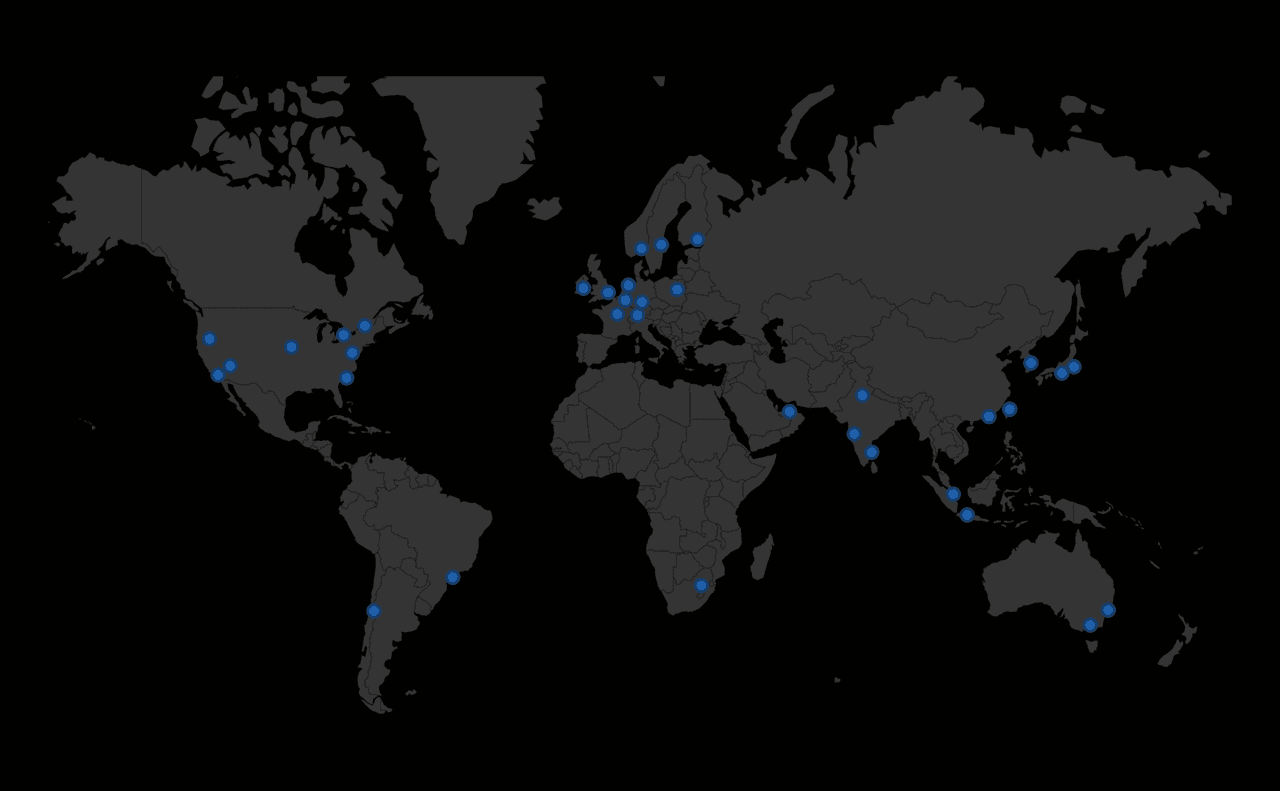
Lab tests from 35 locations and 30+ real device profiles.

Field data first
We start from your Chrome UX Report data, with 12 months of history, to see which metric fails and since when.
JFMAMJJASONDLCP at p75, 12 monthsIllustration
Every template, not just the homepage
Batch tests across home, landing, article, category and product pages, the way Search Console groups similar pages.
- Home
- Landing page
- Article
- Category
- Product
Server response worldwide
TTFB tests from 40 locations, since a slow server delays LCP for every visitor.
 us
 gb
 de
 in
 sg
 jp
 au
 brand 32 more locations
How It Works
- 1
Tell us about your site
Send your URL and a few details. If we're a good fit, we contact you within 1 business day.
- 2
Call and fixed quote
On a call, we walk you through what's slowing your site down. You then get a fixed price and timeline before any work starts.
- 3
Kick-off
Pay 20% to book your slot and share access. We take a full backup and add SpeedVitals RUM to record your starting point.
20% payment - 4
Fixes on staging
We make and test every change on a staging copy, including the menus, forms and buttons INP measures. Your live site stays as it is.
- 5
Review and launch
You review the before and after report. Once you approve, we deploy when your traffic is lowest, and you pay the balance.
Balance paid - 6
30-day field check
We follow your RUM and Chrome UX Report data for 30 days after launch, the full window Google uses, and fix anything that slips.
Most projects take 1 to 2 weeks from kick-off.
Is This Service Right for You?
A good fit
- Sites failing the Core Web Vitals assessment in Search Console or PageSpeed Insights
- SEO teams that need LCP, INP or CLS fixed on the pages that bring in search traffic
- Sites that pass lab tests but fail for real visitors
- Agencies that need a Core Web Vitals specialist for a client site
Not the right fit
- Sites still being built. Optimize once the site is live and getting traffic.
- Anyone who only wants a PageSpeed score screenshot. We optimize for real visitors.
- Sites with too little traffic for field data. Search Console can't show a pass without it, and good hosting and a light theme are usually enough at that size.
Pricing
Starts at
$500+
One-time fee. After the call, you get a fixed price before any work starts.
What affects the price
- Which metrics fail
- Number of page templates
- Custom code and JavaScript frameworks
- Third party scripts and apps
- Server and hosting setup
Pay 20% to start. Pay the balance only after you approve the results.
Speed Up My SiteWhat's included
- All fixes made and tested on staging, then deployed
- A full backup before any change
- Before and after report with lab and field data
- SpeedVitals Real User Monitoring through the 30-day field check
- 30 days of support after launch
What Our Clients Say
From site owners and teams we've worked with.
Our WordPress site speed score improved from 71% to 95% and conversions increased by 16% within two weeks. The team was professional and delivered exactly what they promised.
SMSamarth MathurGrowth Strategist Finally found someone optimizes while focusing on Core Web Vitals. Our Google rankings improved significantly in a month and now the website loads in less than 2 seconds.
PRPaulo RodrígezChief Marketing Officer Worth every penny! The detailed before/after reports and transparent process gave us complete confidence. The bounce rate of our WooCommerce site dropped by 30%.
SHSarah HaygoodWordPress Developer
Frequently Asked Questions
Can't find your answer? Email [email protected].
How much does Core Web Vitals optimization cost?
Our Core Web Vitals optimization service starts at $500. The final price depends on which metrics fail, the number of page templates involved, custom code and JavaScript frameworks, third party scripts and apps, and your server setup. After a call about your site, you get a fixed price before any work starts. You pay 20% to begin and the balance after you approve the results.
Do you guarantee a Core Web Vitals pass?
No, and we don't sell one as an extra. Field data depends on your traffic, your visitors' devices and any code added after launch, and Google needs 28 days of visits to show the result. Instead, we agree on the failing metrics and templates before work starts, you see the before and after in lab tests and SpeedVitals RUM before you pay the balance, and we follow your Chrome UX Report data for 30 days after launch and fix anything that slips.
Do you guarantee a 90+ PageSpeed score?
No. Google's Core Web Vitals assessment doesn't use the PageSpeed score. It uses field data from real visits. A lab score can be raised by holding back scripts, which can make INP worse for real visitors. We work on the metrics Google assesses and report the lab score next to them.
Why does PageSpeed Insights show a good score when Search Console says my pages fail?
The score at the top of PageSpeed Insights comes from one lab test. Search Console uses Chrome UX Report data from real visits over the last 28 days, grouped by similar pages. When a page has too little data, both fall back to your whole site's data. A page can score 90 in the lab and still fail for real visitors on slower phones and networks.
Why is INP failing when my lab test looks fine?
A page load test doesn't click anything, so it can't measure Interaction to Next Paint. INP comes from the clicks, taps and key presses of real visitors, often on menus, filters, forms and add to cart. Total Blocking Time (TBT) in the lab hints at the problem. SpeedVitals RUM shows INP from your own visitors, and our INP Debugger simulates clicks to find the slow scripts.
What does a page need to pass Core Web Vitals?
All three metrics need to be good at the 75th percentile of visits: LCP at 2.5 s or less, INP at 200 ms or less and CLS at 0.1 or less. Google rates mobile and desktop separately, and Search Console labels each group of pages by its worst metric.
When will Search Console show the improvement?
Search Console's Core Web Vitals report uses the last 28 days of Chrome visits, so it fully reflects a fix about four weeks after launch. After launch, we start the report's Validate Fix check, which tracks the fixed issues for 28 days. SpeedVitals RUM shows the change from your visitors right away.
Do Core Web Vitals affect Google rankings?
They play a part. Google says good Core Web Vitals, along with other page experience signals, align with what its core ranking systems reward. It also says Search shows the most relevant content even when the page experience is poor. A pass helps your pages compete, but it won't outrank better content, and we don't promise a ranking gain. Read Google's documentation
Will a speed plugin fix Core Web Vitals?
A caching or optimization plugin often fixes part of LCP, and we set one up when it helps. It can't remove heavy third party scripts, slow server responses or layout shifts from late content, and settings that delay every script can make INP worse. Those need changes in the theme, scripts or server.
Do you only fix the URLs Search Console flags?
No. Search Console shows a few example URLs for each group of similar pages. We fix the template behind the group, then test every key template on mobile and desktop, so the fix also covers pages the report doesn't list.
What access do you need?
Usually admin access to your CMS or code, hosting or server access (SFTP or SSH), and access to your CDN if caching changes are needed. If you'd rather not share some access, we can work with your developer. Please don't send passwords through the form.
Can I fix Core Web Vitals myself?
Yes. Check your field data with our free Core Web Vitals Checker, then find the cause with the LCP Finder, CLS Finder and INP Debugger. Bring us in when you'd rather have the fixes made and proven in your field data.
Do you work on every platform?
Yes. We fix Core Web Vitals on WordPress, Magento and Adobe Commerce, Next.js and React, Drupal and custom sites, and we have dedicated services for WooCommerce and Shopify stores. For page speed beyond Core Web Vitals, see our website speed optimization service.
Find Out Why Your Site Fails Core Web Vitals
Tell us about your site. If we're a good fit, we'll contact you within 1 business day to walk through the fixes and a fixed price.