FlyingPress vs WP-Rocket - Which is better?

A WordPress performance plugin should not be judged by one clean PageSpeed Insights screenshot. For a practical example of plugin-led optimization, check the walkthrough on improving WordPress Web Vitals.
That screenshot is useful. It shows what happened in a controlled lab run. But your visitors do not all use the same device, network, location, theme path, checkout flow, or third-party script timing. Core Web Vitals are judged in the field, across real users.
That is why FlyingPress vs WP Rocket is more interesting than a normal caching plugin comparison. Both can cache pages. Both can delay JavaScript. Both can optimize CSS and images. The difference is how closely each plugin lines up with the problems that usually hurt real-user LCP, INP, CLS, and TTFB.
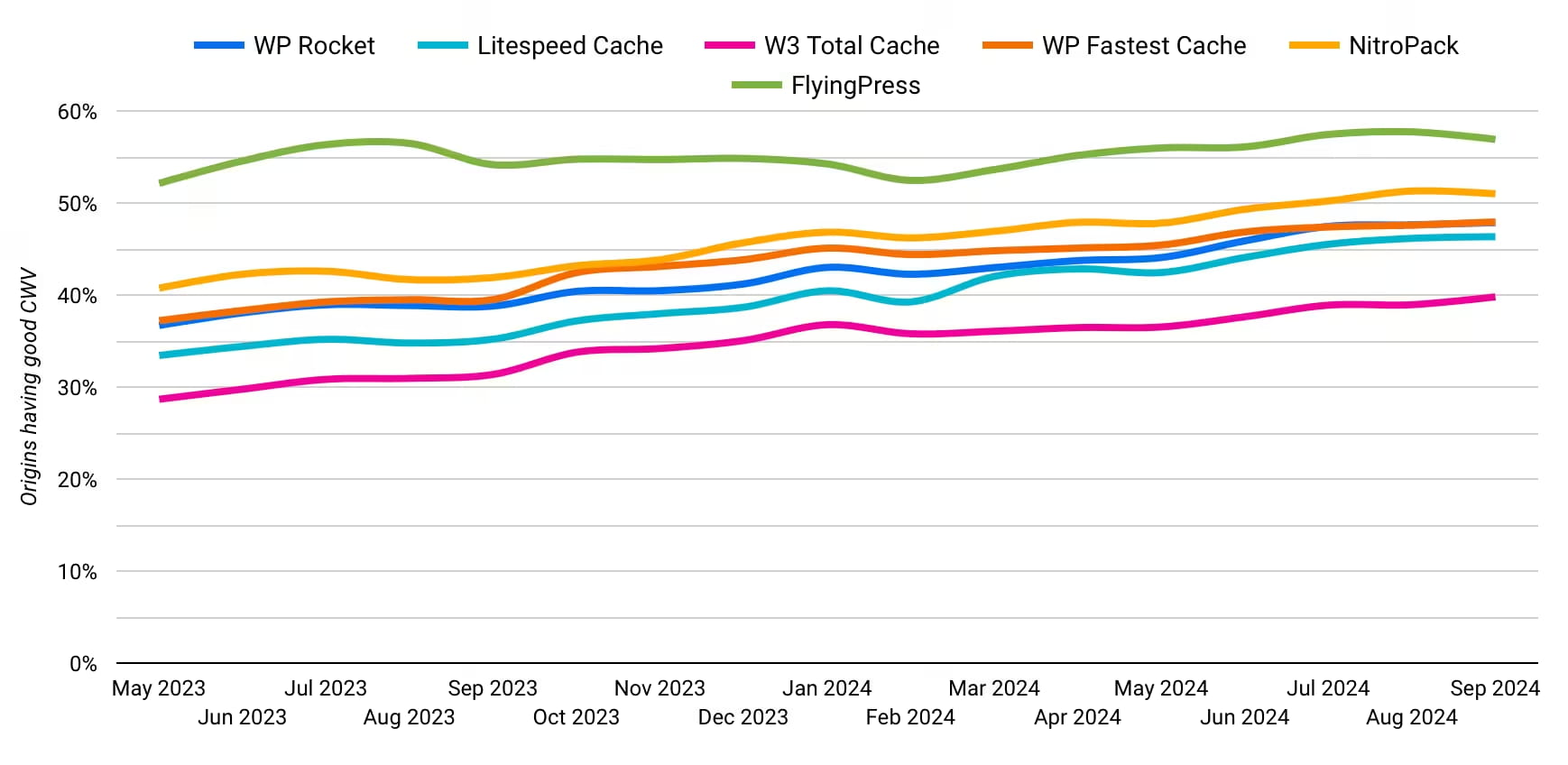
FlyingPress puts Core Web Vitals at the center of its product. It says it is #1 in Chrome UX Report for Core Web Vitals based on its analysis of public HTTP Archive and Chrome UX Report data. WP Rocket takes a broader mainstream route: safer defaults, a larger ecosystem, familiar support, and a setup many WordPress users already know.
So the better question is not "which plugin has more toggles?" It is: which one gives you the best chance of improving real-user performance without breaking the site?
But if you need a short and quick answer, go with FlyingPress
Where each plugin fits
If you are comparing FlyingPress vs WP Rocket, start with the job you need the plugin to do.
WP Rocket is the familiar choice. It is mature, widely documented, and comfortable for agencies that already know its exclusions, defaults, and support flow. On many WordPress sites, installing WP Rocket and enabling the recommended settings can improve performance quickly.
FlyingPress is the more Core Web Vitals-focused choice. Its current stack is built around real-user vitals tracking, Cloudflare full-page caching, image optimization, remove unused CSS, load-when-idle JavaScript, and smarter handling of above-the-fold resources.
| Use case | Better fit | Why |
|---|---|---|
| Improving Core Web Vitals field data | FlyingPress | Stronger focus on CrUX, RUM, LCP, INP, CLS, and TTFB |
| Simple install-and-go caching | WP Rocket | Mature defaults and broad WordPress familiarity |
| Cloudflare full-page caching without APO | FlyingPress | Native Cloudflare integration can cache HTML on the free Cloudflare plan |
| One website | Tie | Both start at $59/year |
| 3 to 10 websites | FlyingPress | Better plan fit for small agencies |
| 50+ websites | FlyingPress | FlyingPress has better multi-site license tiers |
| Testing before paying | FlyingPress | 14-day free trial instead of refund-only purchase |
This already points to a practical pattern. WP Rocket is easier to choose when operational safety and familiarity matter most. FlyingPress becomes more compelling when the brief is specifically Core Web Vitals.
Why Core Web Vitals should decide this comparison
Caching helps WordPress, but caching alone does not fix every Core Web Vitals problem.
Largest Contentful Paint is often delayed by slow HTML, render-blocking CSS, late hero images, heavy fonts, or bad resource priority. Interaction to Next Paint is usually about JavaScript: theme scripts, analytics, ads, chat widgets, popups, consent banners, and anything else competing for the main thread. Cumulative Layout Shift comes from missing dimensions, late embeds, font swaps, ads, sticky headers, and lazy-rendered sections. If CLS is your main issue, the safest starting point is to reserve space to prevent layout shift.
A good performance plugin needs to help across those problems, not only store static HTML.
| Metric | What usually hurts it | What the plugin needs to handle |
|---|---|---|
| LCP | Slow HTML, delayed hero image, render-blocking CSS, heavy fonts | Page caching, critical CSS, LCP image priority, image compression, font handling |
| INP | Heavy JavaScript, third-party tags, delayed event handling | Script delay, defer, load when idle, lazy rendering, third-party control |
| CLS | Missing dimensions, late embeds, font swaps, lazy rendered sections | Width and height handling, stable lazy loading, font optimization, careful rendering delays |
| TTFB | Slow origin, no full-page cache, distant server | HTML caching, CDN/edge caching, cache preloading |
Lab tests are controlled diagnostics. You can run the same URL from the same location with the same device profile and compare the waterfall. That is how you find bottlenecks.
Field data shows what real users experienced. Chrome UX Report and RUM are messier, but they are closer to what site owners actually care about. A plugin that performs well in the field is usually solving the less obvious problems: real devices, real scripts, real layout shifts, real network conditions.
SpeedVitals separates synthetic testing and real-user monitoring for the same reason. Use lab tests to find the issue. Use SpeedVitals RUM and the SpeedVitals Core Web Vitals Checker to see whether real visitors improved.
FlyingPress and the Chrome UX Report angle
FlyingPress has made Chrome UX Report a central part of its positioning. In its CrUX article, FlyingPress says it ranks #1 in Core Web Vitals using a dataset based on HTTP Archive and the Chrome UX Report.
That matters because CrUX is field data. It comes from opted-in Chrome users visiting real websites. HTTP Archive can detect technologies used on pages, while CrUX reports Core Web Vitals outcomes for eligible origins and URLs. Put together, those data sources can show how sites using different optimization plugins perform in the wild.
For this comparison, the claim is useful because it matches the product direction. FlyingPress is not only selling page caching. It is selling a stack built around the way Core Web Vitals are measured now: LCP, INP, CLS, TTFB, real-user tracking, and better handling for scripts and above-the-fold resources.
WP Rocket has also moved beyond simple caching. Rocket Insights gives users a performance hub inside WordPress, and its newer features help with lazy rendering and critical image handling. But FlyingPress talks more directly to field performance, and that shows up across its feature set.
Feature comparison: FlyingPress vs WP Rocket
Both plugins cover the basics: page caching, cache preloading, CSS optimization, JavaScript delay, lazy loading, database cleanup, and CDN compatibility. The difference is where each product is investing.
WP Rocket invests in simplicity, compatibility, guided recommendations, and a familiar dashboard experience. FlyingPress invests in real-user Core Web Vitals, Cloudflare integration, built-in image optimization, and optimization decisions based on real browser rendering.
| Feature | FlyingPress | WP-Rocket | Edge | Why it matters for Core Web Vitals |
|---|---|---|---|---|
| Page caching | Static HTML page cache | Static HTML page cache | Tie | Reduces server work and can improve TTFB |
| Cache preloading | Yes | Yes, sitemap-aware | Tie | Keeps cached pages warm before users arrive |
| Remove unused CSS | Yes | Yes | FlyingPress | FlyingPress positions CloudOptimizer around real browser rendering |
| Critical CSS | Yes | Yes | FlyingPress | Helps render above-the-fold content sooner |
| JavaScript delay | Yes | Yes | Tie | Can reduce render delay and main-thread pressure |
| Load when idle / INP handling | Load when idle and third-party detection | Automatic Lazy Rendering and JS delay | FlyingPress | INP is often script-driven on modern WordPress sites |
| Lazy rendering | Yes | Yes | Tie | Can reduce initial rendering work if configured safely |
| LCP image handling | Prioritize above-fold images and resources | Critical Image Optimization | Close | Both help, but FlyingPress also bundles image optimization |
| Image optimization | Built in, AVIF/WebP/original | Usually paired with Imagify | FlyingPress | Image weight and format often affect LCP |
| Google Fonts optimization | Self-host, combine, preload | Font optimization features | Tie | Reduces font-related render delay and layout shifts |
| Cloudflare full-page caching | Native integration without APO | Cloudflare add-on, APO/Page Rules often needed for HTML edge caching | FlyingPress | Edge HTML caching can reduce TTFB for global users |
| CDN option | FlyingCDN on Cloudflare Enterprise | RocketCDN | Depends | Choose based on your CDN stack and regions |
| Built-in performance monitoring | Core Web Vitals tracking from real users | Rocket Insights performance hub | FlyingPress for field data | RUM is closer to user experience than a synthetic retest |
| Database optimization | Yes | Yes | Tie | Useful housekeeping, but rarely the main CWV lever |
| eCommerce compatibility | Yes, with exclusions and purge handling | Yes, mature eCommerce compatibility | WP-Rocket | Checkout safety matters more than raw speed |
| WP-CLI / developer control | Yes | Some support, less central | FlyingPress | Useful for agencies and repeatable deployments |
FlyingPress is pretty strong when comparing the features. It has strong caching, critical image optimization, lazy loading, JavaScript delay, remove unused CSS, and RUM. FlyingPress is a clear winner here even though WP-Rocket comes close in most of the aspects.
Core Web Vitals breakdown
LCP: FlyingPress has more direct levers
LCP is often won or lost before the visitor sees anything useful. If the HTML response is slow, the browser starts late. If critical CSS blocks rendering, the browser waits. If the hero image is lazy loaded by mistake, the biggest visual element arrives too late.
WP Rocket can improve LCP quickly on many sites. Its page caching, cache preloading, Critical Image Optimization, lazy-load exclusions, and CSS features cover the usual WordPress problems.
FlyingPress has a broader stack under one license. It includes image optimization, resource prioritization, Cloudflare page caching, remove unused CSS, and above-the-fold handling. If a site's LCP problem is a mix of slow TTFB, heavy images, and render-blocking CSS, FlyingPress gives you more direct controls without adding another image plugin.
For Cloudflare users, the HTML edge caching point is practical. If visitors are spread across countries, reducing TTFB from distant regions can matter as much as optimizing the final hero image.
Related SpeedVitals reading: How to Preload Largest Contentful Paint Image
INP: FlyingPress lines up better with newer interaction problems
INP replaced FID as a Core Web Vital because it measures responsiveness across the page's life, not only the first interaction. That makes third-party scripts harder to ignore.
Analytics tags, chat widgets, ads, popups, cookie banners, forms, filters, and theme JavaScript can all delay user interactions. The site may look loaded, but the browser can still be busy.
Both plugins offer JavaScript delay and lazy rendering features. WP Rocket's Delay JavaScript and Automatic Lazy Rendering are relevant here.
FlyingPress gets more interesting because its v5 direction is built around current INP problems. Load when idle, automatic third-party handling, and script execution control are exactly the kind of features needed on modern WordPress sites where the theme is not always the biggest problem. Often the problem is everything added after launch.
Test this carefully. Delaying JavaScript can break consent banners, menus, filters, search, checkout behavior, and analytics. Run a SpeedVitals test before and after, then click through the real user flow on staging.
CLS: this is closer than LCP and INP
CLS is more theme-specific than plugin pages make it sound. A plugin can add missing image dimensions and improve lazy loading behavior, but layout shifts can also come from cookie banners, ads, injected forms, fonts, sliders, sticky headers, and late-loading embeds.
Both FlyingPress and WP Rocket can help. WP Rocket has mature lazy loading and critical image handling. FlyingPress has layout shift reduction, lazy loading, Smart Lazy Render style behavior, and stronger handling around images and above-fold resources.
Do not switch plugins only for CLS unless you know the shift is caused by images, embeds, lazy loading, or render timing. Use the waterfall and layout shift diagnostics first.
Field data: FlyingPress has the cleaner fit
This is the clearest difference.
FlyingPress says it tracks TTFB, LCP, INP, and CLS from real users. Its pricing page also repeats the real-user Core Web Vitals positioning based on HTTP Archive and Chrome UX Report data.
WP Rocket's Rocket Insights is useful. It gives performance guidance inside WordPress and helps users decide which features to enable. But for a Core Web Vitals comparison, FlyingPress is more directly aligned with field measurement.
That fits the SpeedVitals view: lab tests diagnose; field data tells you what users experienced.
Pricing: FlyingPress works better for both small and large agencies
Pricing changes, so check both vendor pages before publishing. The comparison below is based on the vendor pages reviewed for this draft.
| Site count | FlyingPress | WP-Rocket | Better fit |
|---|---|---|---|
| 1 site | $59/year | $59/year | Tie |
| 3 sites | $109/year | $119/year | FlyingPress |
| 10 sites | $229/year | No direct 10-site plan | FlyingPress |
| 50 sites | $279/year (Unlimited sites) | Multi starts at $299/year for 50 sites | FlyingPress |
| Unlimited / small agency | $279/year unlimited | No unlimited plan shown | FlyingPress |
FlyingPress also offers a 14-day free trial. That matters if you want to test on staging before paying. Its pricing FAQ says staging and development sites do not count toward the license.
WP Rocket has a 14-day refund policy instead of a trial. For many users, that is fine. For agencies testing plugins across client sites, a trial is cleaner.
Whether you're small agency managing fewer sites or a larger agency, FlyingPress pricing is hard to ignore. For larger agencies managing 50, 100, or 500 sites, FlyingPress's Unlimited makes more sense.
Should you switch from WP Rocket to FlyingPress?
Switch to FlyingPress if:
- You are chasing stubborn LCP or INP issues.
- You use Cloudflare and want full-page HTML caching without paying for APO.
- You want image optimization inside the same plugin license.
- You manage fewer than 50 sites and pricing matters.
- You want plugin-level real-user Core Web Vitals tracking.
- You are comfortable testing settings on staging before production.
Stay with WP Rocket if:
- Your site already passes Core Web Vitals.
- Your current WP Rocket setup is stable.
- Your team knows WP Rocket support and exclusion workflows.
Do not swap performance plugins blindly on production. Performance plugins touch caching, CSS, JavaScript, images, embeds, fonts, and sometimes CDN behavior. A setting that improves the homepage can break checkout, menus, filters, forms, consent banners, or analytics.
The safe workflow:
- Test the current site in SpeedVitals.
- Clone to staging.
- Configure the new plugin on staging.
- Run the same SpeedVitals test again.
- Click through real user flows: menu, search, cart, checkout, forms, login, filters, and embeds.
- Deploy only if the metrics improve and the user flow still works.
- Monitor real-user Core Web Vitals after deployment.
Final verdict
For most WordPress sites choosing specifically around Core Web Vitals, FlyingPress is the stronger pick.
The reason is not that WP Rocket is weak. WP Rocket is still excellent. The reason is that FlyingPress is more aligned with the way Core Web Vitals are judged now: real-user LCP, INP, CLS, TTFB, Chrome UX Report signals, and RUM-style monitoring.
FlyingPress's CrUX-led positioning supports that direction. Its feature set also supports it: real-user vitals tracking, Cloudflare full-page caching, image optimization, load-when-idle JavaScript, and strong above-the-fold handling.
If the job is to pick the sharper Core Web Vitals tool in 2026, choose FlyingPress, test it on staging, and verify the before-and-after result with SpeedVitals.
FAQ
Is FlyingPress better than WP Rocket for Core Web Vitals?
For most Core Web Vitals-focused WordPress sites, yes. FlyingPress has a stronger fit for real-user performance because it combines Core Web Vitals tracking, Cloudflare full-page caching, image optimization, load-when-idle JavaScript, and above-the-fold optimization. WP Rocket is still decent, especially for users who value familiarity and compatibility.
Is WP Rocket still worth it in 2026?
Yes. WP Rocket is still worth it if you want a mature WordPress performance plugin with broad compatibility, easy defaults, strong documentation, and a larger support ecosystem. It makes the most sense for users who value stability and familiarity more than aggressive Core Web Vitals tuning.
Does FlyingPress really rank #1 in Chrome UX Report?
FlyingPress says it ranks #1 in Core Web Vitals using public HTTP Archive and Chrome UX Report data. That is a useful signal because CrUX is real-user data, not a one-off synthetic test. You should still test your own site before switching plugins.
Which plugin is better for INP: FlyingPress or WP Rocket?
FlyingPress has the stronger INP direction because its newer features focus on script execution, third-party script handling, and load-when-idle behavior. WP Rocket also has relevant features, including Delay JavaScript and Automatic Lazy Rendering, so the final result still depends on your theme, plugins, and third-party scripts.
Which plugin is better for LCP: FlyingPress or WP Rocket?
FlyingPress has the stronger LCP stack overall because it combines caching, image optimization, resource prioritization, remove unused CSS, and Cloudflare full-page caching. WP Rocket can still improve LCP quickly on many WordPress sites, especially when the main issue is caching or above-the-fold image handling.
Do I need both FlyingPress and WP Rocket?
No. Do not run FlyingPress and WP Rocket together. They overlap on caching, CSS optimization, JavaScript delay, lazy loading, and other performance features. Running both can create conflicts, double optimization, broken layouts, cache issues, and harder debugging.
Should I switch from WP Rocket to FlyingPress?
Switch if your site still has LCP or INP problems, you use Cloudflare, you want built-in image optimization, or you want plugin-level real-user Core Web Vitals tracking. Stay with WP Rocket if your site already passes Core Web Vitals and your setup is stable.
How should I test FlyingPress vs WP Rocket on my own site?
Use staging. Run a SpeedVitals test with your current setup, configure one plugin at a time, then run the same test again. Keep the host, theme, content, CDN, and test location the same. After deployment, monitor real-user Core Web Vitals because lab scores do not catch every device, network, or user flow.