How to Choose a Web Performance Optimization Agency

Choosing a web performance optimization agency sounds simple until every proposal starts promising the same thing.
“Better PageSpeed scores.”
“Faster loading.”
“Core Web Vitals improvement.”
“90+ score guaranteed.”
The problem is that web performance is not a single score. A website can look fast in one Lighthouse test and still feel slow for real users. A plugin can improve a PageSpeed report and still break a checkout page. An agency can optimize the homepage while ignoring the product, category, or landing pages that actually bring revenue.
That is why choosing the right agency matters.
A good web performance optimization agency does not just chase a green score. It finds what is slowing users down, fixes the right bottlenecks, validates the improvement, and helps you keep the website fast after the project ends.
Let us break down how to choose one.
Why Choosing the Right Performance Agency Is Harder Than It Looks
Website performance touches almost every part of a modern site.
It is affected by your frontend code, theme, plugins, JavaScript bundles, fonts, images, server response time, CDN setup, third-party scripts, analytics tags, ads, consent banners, personalization tools, and even how your pages are designed.
That means a real performance project is rarely just “compress images” or “install a cache plugin.”
Those things can help, especially on WordPress or WooCommerce sites, but they are only one part of the picture. The harder problems usually live deeper:
- The hero image starts loading too late.
- JavaScript blocks the main thread.
- CSS delays the first render.
- The server takes too long to respond.
- Third-party scripts slow down interaction.
- Layout shifts happen after ads, banners, or fonts load.
- A page is fast in the lab but slow for real mobile users.
And the best part? Most of these issues are measurable.
If you want a starting point before speaking to vendors, run a baseline test with SpeedVitals and keep the report handy. It gives you a neutral reference point before any agency starts making recommendations.
That is exactly why the right agency should be comfortable talking about metrics, tradeoffs, testing, and monitoring, not just one-time fixes.
What a Web Performance Optimization Agency Should Actually Do
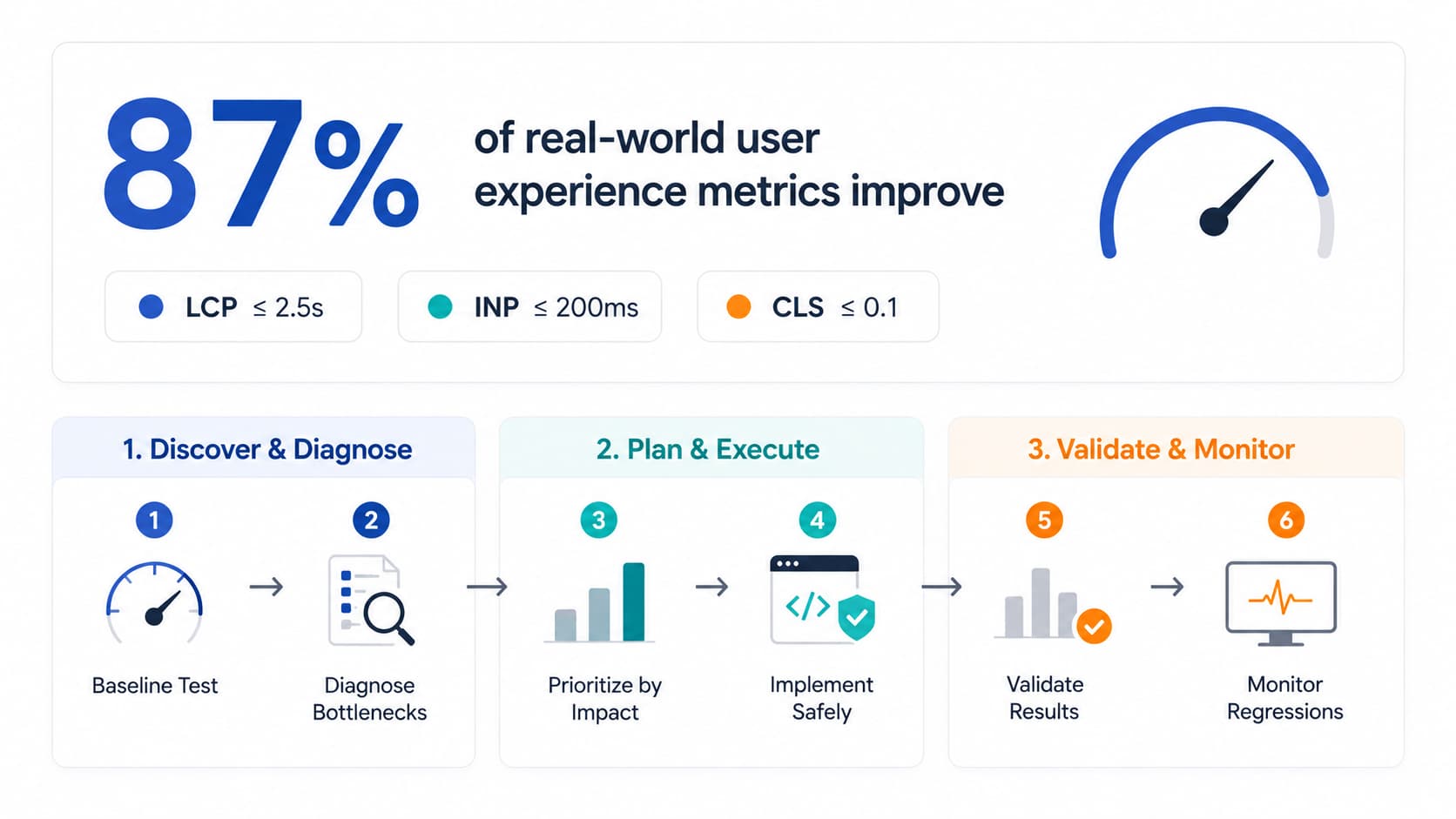
A good agency should follow a process that looks something like this:
- Measure the current website performance.
- Identify the biggest bottlenecks.
- Prioritize fixes by user and business impact.
- Implement improvements safely.
- Validate the results with before/after data.
- Set up monitoring so performance does not regress.
- Explain the results in a way your team can understand.
That process matters because performance optimization is full of tradeoffs.
For example, deferring JavaScript can improve load performance, but it can also break menus, forms, analytics, or checkout tracking if done carelessly. Lazy-loading images can help, but lazy-loading the LCP image can make the most important content slower. Removing CSS can reduce file size, but overly aggressive cleanup can break layouts. These are the kinds of web performance mistakes a good agency should know how to avoid.
The agency you choose should understand these tradeoffs before touching your site.
12 Questions to Ask Before Hiring a Web Performance Agency
Before you hire an agency, ask these questions. Their answers will tell you whether they have a serious performance process or just a list of generic optimizations.
1. Which metrics do you optimize for?
If the answer is only “PageSpeed score,” be careful.
PageSpeed Insights and Lighthouse are useful, but they are not the whole story. A strong agency should talk about Core Web Vitals and user-centered metrics. You can also use the SpeedVitals Core Web Vitals Checker to benchmark the same pages before and after agency work. The key metrics are:
- Largest Contentful Paint (LCP): how quickly the main content appears.
- Interaction to Next Paint (INP): how responsive the page feels after user interactions.
- Cumulative Layout Shift (CLS): how visually stable the page is while loading.
Google’s Core Web Vitals guidance focuses on these user experience signals. A good agency should know what each metric means, what causes it to fail, and how to fix it without creating new problems.
2. Do you use lab data, field data, or both?
This is one of the most important questions.
Lab data comes from controlled tests. It is useful because it is repeatable. You can test a page before and after a change under similar conditions.
Field data comes from real users. It shows what actual visitors experience across different devices, networks, countries, and browsers. If you want the exact distinction, our guide on field data explains it in more detail.
You need both.
Lab tests help diagnose issues quickly. Field data, or real user monitoring, tells you whether the website is actually faster for visitors.
If an agency only sends Lighthouse screenshots, they may be missing the real user experience. For ongoing validation, SpeedVitals Real User Monitoring helps you compare lab claims with what actual visitors experience.
3. How do you diagnose LCP, INP, and CLS?
Each Core Web Vital has different causes.
For LCP, the issue might be slow server response, render-blocking CSS, an unoptimized hero image, late resource discovery, or client-side rendering.
For INP, the issue is usually JavaScript. Heavy scripts, long tasks, hydration, third-party tags, or expensive event handlers can make the page slow to respond.
For CLS, the issue may be missing image dimensions, late-loading ads, injected banners, font swaps, or layout changes after content loads. A strong agency should know how to reserve space to prevent layout shift instead of only trying to hide the symptom.
The agency should be able to explain how they diagnose each metric. If they use the same checklist for every site, they are probably not doing deep performance work.
4. Can you show before/after proof from real users?
Before/after proof should not be limited to a single best-case test.
Ask for examples of how they measure improvement across:
- important page templates,
- mobile and desktop,
- lab test results,
- field data or RUM,
- Core Web Vitals trends,
- and business-critical flows such as product pages, lead forms, or checkout.
A serious agency should be comfortable proving results with data.
5. What platforms do you specialize in?
Performance issues vary by platform.
A WordPress site with Elementor, WooCommerce, and ten marketing plugins has different bottlenecks from a Shopify store with multiple apps. A Next.js site has different issues from a legacy custom frontend.
Ask whether the agency has experience with your stack:
- WordPress
- WooCommerce
- Shopify
- Magento
- React / Next.js
- Laravel or custom stacks
- headless CMS setups
- enterprise frontend architectures
Platform experience matters because the wrong fix can break important functionality.
6. How do you handle third-party scripts?
Third-party scripts are one of the most common performance problems.
Analytics, ads, chat widgets, heatmaps, A/B testing tools, review widgets, personalization scripts, and tag managers can all slow down a page.
But they are also there for a reason. The agency cannot simply remove everything.
A good agency should audit third-party scripts and help you decide:
- which scripts are required,
- which can be delayed,
- which can be loaded only on specific pages,
- which duplicate each other,
- and which are causing the most performance cost.
This is especially important for ecommerce and lead-generation sites where tracking and conversion scripts are business-critical.
7. What changes will you make to code, hosting, CDN, images, CSS, and JavaScript?
Ask for the actual scope of work.
Some agencies only configure plugins. Some only write recommendations. Some work directly with code. Some coordinate with your developers.
You need to know what they will actually change.
Common performance work may include:
- image compression and responsive image setup,
- lazy loading fixes,
- LCP image prioritization,
- critical CSS generation,
- removing or deferring unused JavaScript,
- reducing render-blocking resources,
- improving caching rules,
- optimizing CDN configuration,
- reducing server response time,
- and setting performance budgets.
The more specific the agency is, the easier it is to evaluate them.
8. How do you avoid breaking layouts, tracking, checkout, and conversions?
Performance fixes can break things.
A script delay can break analytics. CSS cleanup can break layout. Lazy loading can delay important images. Optimization plugins can conflict with themes, page builders, or checkout flows.
That is why every agency should have a testing and rollback process.
Ask:
- Do you test on staging first?
- Do you test mobile and desktop layouts?
- Do you check checkout, forms, menus, search, and tracking?
- Can changes be rolled back quickly?
- Who approves changes before they go live?
A good agency should be careful, not reckless.
9. What deliverables will we receive?
You should not pay for a vague “speed optimization completed” message.
At minimum, expect:
- baseline performance audit,
- prioritized issue list,
- explanation of root causes,
- recommended fixes,
- implementation summary,
- before/after test results,
- Core Web Vitals report,
- and next-step recommendations.
For larger projects, you may also expect:
- code changes or pull requests,
- performance budgets,
- RUM dashboard setup,
- monitoring alerts,
- stakeholder-ready reports,
- and developer handoff documentation.
The deliverables should make the work understandable and repeatable.
10. How do you prioritize fixes?
Not every performance issue deserves equal attention.
A 200 KB image on a low-traffic blog post may matter less than a slow LCP image on your highest-converting landing page. A minor Lighthouse warning may matter less than a checkout interaction delay affecting thousands of users.
A good agency should prioritize based on:
- traffic,
- revenue impact,
- Core Web Vitals severity,
- implementation effort,
- technical risk,
- and whether the issue affects many pages or just one.
This is where performance work becomes strategic.
11. What happens after the project ends?
Websites slow down again.
New plugins get installed. Themes change. Marketing teams add tags. Developers ship new features. Images get uploaded without optimization. Apps and third-party scripts change behavior.
So if the agency only optimizes the site once and leaves, the improvement may not last.
Ask how they prevent regressions.
The answer should include some form of monitoring, reporting, alerts, or performance budgets. Even a simple weekly performance report is better than waiting for rankings or conversions to drop before noticing a problem. If you manage client sites, SpeedVitals performance monitoring can help catch regressions before they become client escalations.
12. How do you report results to non-technical stakeholders?
Performance work often involves multiple people: marketers, developers, founders, SEO teams, ecommerce managers, and clients.
A good agency should be able to explain results without drowning everyone in technical details.
The report should answer:
- What was slow?
- What was fixed?
- What improved?
- What did not improve yet?
- What should be done next?
- How does this affect users or business outcomes?
Clear reporting is especially important for agencies managing performance work for their own clients.
A report presentation helps agencies communicate their findings, recommendations, and measurable results in a clear and engaging way, ensuring stakeholders understand the value of the optimization efforts.
Red Flags to Watch For
Some warning signs are easy to spot.
They guarantee a perfect PageSpeed score
A 100 score is not always realistic, necessary, or even the right goal. The goal is better user experience and business impact.
They only talk about Lighthouse
Lighthouse is useful, but it is a lab test. If an agency never mentions field data, real users, or ongoing monitoring, they are missing a major part of performance work.
They use the same plugin stack for every site
This is common in WordPress speed optimization services. A plugin can help, but every site has different constraints. Blindly applying the same settings can break layouts or tracking.
They ignore third-party scripts
For many sites, third-party scripts are a major source of performance problems. Ignoring them means ignoring the real bottleneck.
They cannot explain LCP, INP, and CLS clearly
You do not need them to give a lecture, but they should be able to explain what each metric means and how they plan to improve it.
They have no monitoring plan
Performance is not a one-time project. If there is no monitoring, you may not know when the site becomes slow again.
What Deliverables Should You Expect?
A proper web performance optimization project should leave you with more than a faster page.
It should leave you with clarity.
Here is what good deliverables look like:
If you are an agency hiring a specialist for client work, this matters even more. You need reports your client can understand, not just technical logs.
How to Validate Agency Results With Lab and Field Data
This is where many teams make mistakes.
They hire an agency, receive a better PageSpeed screenshot, and assume the project worked.
But one screenshot is not enough.
You should validate performance in two ways.
Use lab tests for controlled before/after comparison
Lab tests are useful because they let you compare the same URL under similar test conditions. They help you debug specific changes and understand what improved.
Before the agency starts, run tests on your key pages:
- homepage,
- product or service pages,
- category pages,
- landing pages,
- blog pages,
- and checkout or lead-generation flows where possible.
After the work is complete, test the same URLs again.
Look at more than the final score. Check LCP, INP/TBT proxies in lab tools, CLS, render-blocking resources, image loading, JavaScript execution, and waterfall behavior.
Use field data to understand real users
Field data shows what actual users experience.
This matters because users are not all on the same device, connection, browser, or location. A site may be fast on a high-end desktop and slow on a budget Android phone. It may be fast in one country and slow in another.
Google’s Web Vitals guidance recommends evaluating Core Web Vitals at the 75th percentile across mobile and desktop. That means the goal is not just making the average page load look good. The experience should be good for most users.
This is where Real User Monitoring becomes valuable.
With a tool like SpeedVitals RUM, you can see whether the agency’s changes improved real user experience, not just lab conditions.
Platform-Specific Checks
The right questions also depend on your platform.
WordPress and WooCommerce
For WordPress, ask how the agency handles:
- theme and page builder bloat,
- plugin CSS and JavaScript,
- WooCommerce cart fragments and checkout scripts,
- caching rules,
- CDN configuration,
- image optimization,
- fonts,
- critical CSS,
- and database/server response issues.
Be careful with agencies that only install a cache plugin or an optimization plugin and call the project done. WordPress speed optimization often needs a mix of plugin configuration, theme cleanup, asset optimization, server/CDN tuning, and page-level testing.
For WooCommerce, testing is even more important. Cart, checkout, payment, coupons, shipping calculators, and tracking scripts must continue working after optimization.
Shopify
For Shopify, ask about:
- theme code,
- app scripts,
- product and collection templates,
- image loading,
- unused JavaScript,
- third-party pixels,
- and conversion-critical pages.
Shopify sites often become slow because every app adds scripts. The agency should know how to evaluate app cost and decide what can be delayed, replaced, or removed.
Custom and Enterprise Stacks
For custom sites, performance work may involve:
- JavaScript bundle splitting,
- hydration strategy,
- server rendering,
- CDN caching,
- API response timing,
- frontend architecture,
- third-party governance,
- and performance budgets in CI/CD.
In this case, you may need a web performance consultant who can work directly with engineering, not just a general SEO agency.
How SpeedVitals Helps You Evaluate Any Agency
You do not need to rely only on the agency’s own reports.
Before hiring anyone, run your important pages through SpeedVitals and save the baseline results. After the agency completes the work, test the same pages again.
Use SpeedVitals to check:
- whether LCP improved,
- whether layout shifts were reduced,
- whether render-blocking resources changed,
- whether page weight improved,
- whether the waterfall looks healthier,
- and whether mobile performance improved.
For ongoing validation, Real User Monitoring helps you see what actual visitors experience after changes go live. Weekly performance reports can also help teams and clients stay informed without manually checking dashboards every day.
If you are an agency managing multiple client websites, the SpeedVitals for Agencies page explains how teams can use monitoring and reporting workflows across client accounts.
This gives you an independent way to evaluate the agency’s work.
And that is important.
The best agencies will welcome independent measurement because it proves their work. The weaker ones may only want to show their own best-case screenshots.
Final Checklist Before Signing
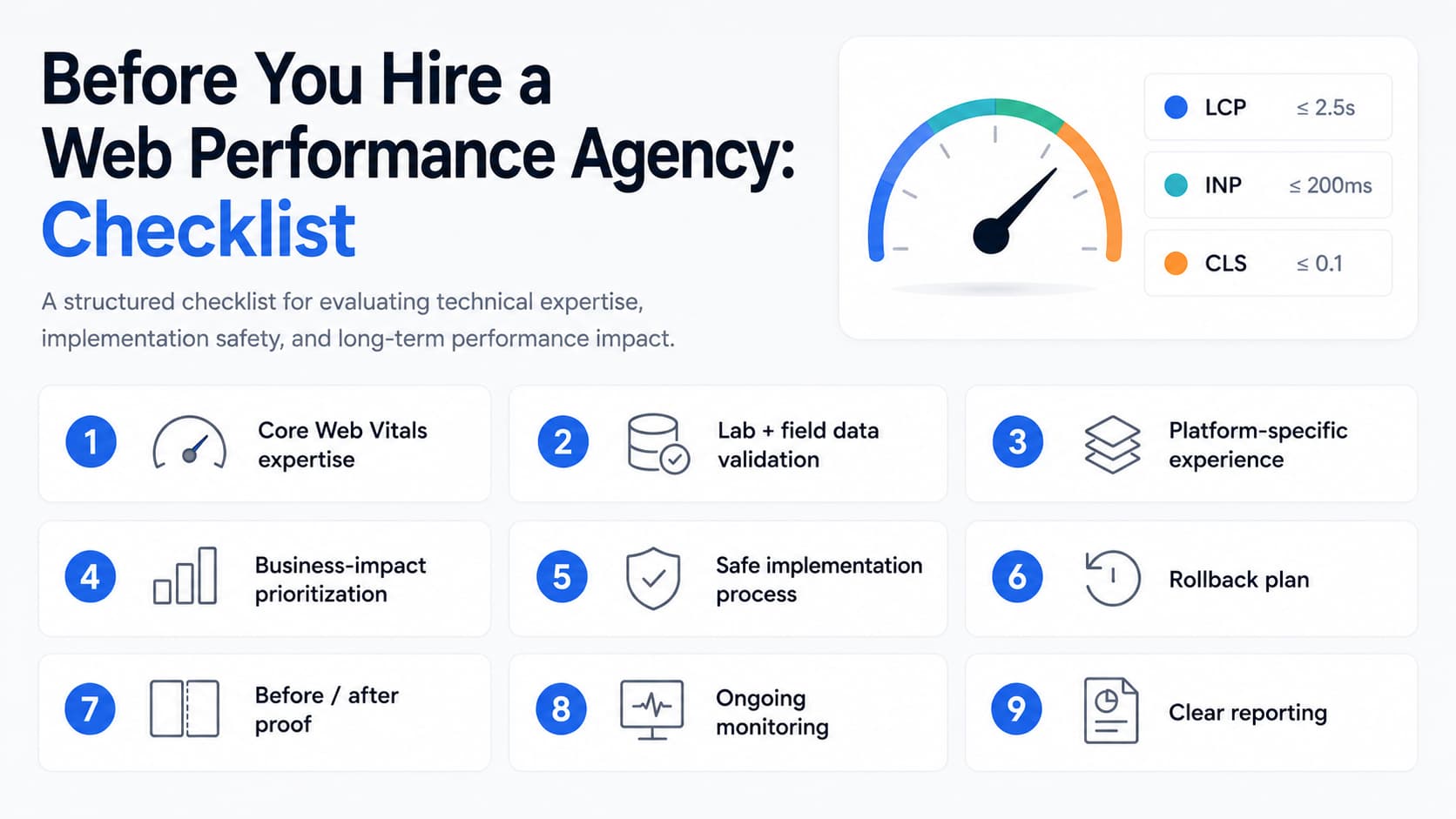
Before choosing a web performance optimization agency, make sure you can answer these questions:
- Do they understand Core Web Vitals beyond basic definitions?
- Do they use both lab and field data?
- Have they worked with your platform before?
- Can they explain what is currently slowing your site down?
- Do they prioritize fixes by business impact?
- Will they test changes before pushing them live?
- Do they have a rollback plan?
- Will they validate results with before/after data?
- Do they monitor performance after the project ends?
- Can they explain results clearly to non-technical stakeholders?
- Are they honest about tradeoffs and limitations?
- Do they care about real user experience, not just a score?
If the answer is yes, you are probably talking to a serious agency.
If the answer is no, keep looking.
Final Thoughts
The right web performance optimization agency should make your website faster, but it should also make your team smarter.
You should understand what was slow, what was fixed, what improved, and how to prevent the same issues from coming back.
Do not hire an agency only because they promise a better PageSpeed score. Hire the one that can explain the problem, fix the right bottlenecks, prove the results, and help you monitor performance over time.
If you need a Web Performance Optimization agency that follows these guidelines, look no further than SpeedVitals. You can fill this form to get a free initial audit from our team.
Before you start that conversation, run a website speed test and collect your baseline.
That way, you are not buying promises.
You are measuring progress.