WooCommerce vs Shopify in 2026: Which is Better?

Most WooCommerce vs Shopify comparisons start with the same line: WooCommerce is free, and Shopify costs $29 a month. That framing is wrong on both sides, and it skips the question that actually decides which platform will work for your store.
The real difference in 2026 is who is responsible for keeping the shopping journey fast and reliable. On Shopify, the platform runs the hosting and checkout infrastructure. On WooCommerce, you (or your host and developer) own every layer, from the PHP workers to the database that writes the order.
In this article, we will compare WooCommerce 11.2 and Shopify's 2026 plans on setup, real costs in the US and India, Core Web Vitals field data, uncached checkout performance, and customization. Let's find out which one fits your store.
Shopify is the better default if you want to launch quickly and don't want to manage hosting, updates, and checkout infrastructure. WooCommerce is the better choice when custom workflows, an existing WordPress content site, full data control, or payment economics justify owning the technical work. In the 2025 HTTP Archive Web Almanac, 76% of Shopify sites passed Core Web Vitals on mobile against 35% of WooCommerce sites, but that's a pass rate across thousands of stores, not a checkout speed benchmark.
This is a documented assessment as of 9 October 2026. We didn't run a controlled load test between the two platforms for this article. Prices come from the official Shopify and WooCommerce pricing pages, the field data comes from the HTTP Archive, and the WooCommerce performance figures are vendor-reported examples from its developer blog.
Plan prices and payment availability change often, so recheck them before you sign up or sign a contract.
What Changed by October 2026
Many WooCommerce vs Shopify articles still quote facts from 2023. Here's what is current:
- WooCommerce 11.2.0 was released on 7 October 2026 and is the current stable version, according to the official release notes.
- High-Performance Order Storage (HPOS) has been on by default for new WooCommerce installs since version 8.2 (October 2023). Older stores need to check whether they've migrated and whether all their extensions support it.
- Shopify's plans are Basic, Grow, Advanced, and Plus. Some older articles still call Grow the "Shopify" plan.
- Shopify allows up to 2,048 variants and three options per product, according to its variant documentation. The 100-variant limit quoted in older comparisons is outdated.
- Shopify checkout customization depends on your plan. Basic branding works below Plus, but checkout UI extensions on the information, shipping, and payment steps need Shopify Plus.
WooCommerce vs Shopify at a Glance
| Criterion | WooCommerce | Shopify | Edge |
|---|---|---|---|
| Launch without technical help | You pick and test hosting, theme, plugins, payments, and caching | Guided setup with hosting included | Shopify |
| Day-to-day admin | Good after setup, but plugin screens can fragment the workflow | More standardized admin | Shopify |
| Maintenance | WordPress, WooCommerce, plugins, theme, PHP, security, and backups | Core platform maintained; you still manage apps, theme, and integrations | Shopify |
| Hosting and server control | Your choice of host, PHP, database, cache, and CDN | Managed, with little control over the backend | WooCommerce |
| Code and database access | Full access | Theme and API access only | WooCommerce |
| Content and publishing | Full WordPress editorial tooling | Adequate blog and pages | WooCommerce |
| Platform fee on third-party gateways | None | 0.2% to 2%, depending on plan | WooCommerce |
| Cost predictability | Hosting is clear; developer and maintenance costs vary | Fixed subscription; apps and payment charges vary | Shopify |
| Mobile Core Web Vitals pass rate (2025 field data) | 35% of sites | 76% of sites | Shopify |
| Promotional traffic spikes | Scales with engineering, testing, and budget | Managed infrastructure | Shopify |
| Complex checkout and business rules | Source-level freedom, more upkeep | Limited to apps, Functions, and Plus features | Depends |
| SEO control | Deep technical control | Good fundamentals, some URL and backend limits | WooCommerce |
| POS and physical retail | Integrations you choose and run | Integrated POS (check local availability) | Shopify |
| Vendor lock-in | Lower, though plugins and custom code still bind you | Higher dependence on Shopify's APIs and apps | WooCommerce |
Shopify wins most of the operational rows, and WooCommerce wins most of the control rows. But those rows don't carry equal weight for every store, so the rest of this article goes through the ones that usually decide it.
Setup and Daily Operation
Simplicity means two different things in ecommerce, and the two platforms don't win both by the same margin.
Easy to launch: Shopify wins in almost every new, non-technical setup. A WooCommerce launch is a chain of connected decisions (host, theme, payment plugin, caching, shipping and tax extensions), and each choice affects the others.
Easy to run after customization: Shopify still usually wins for conventional retail. But a trained team with unusual workflows can find WooCommerce easier, because the Shopify alternative is often a stack of apps and workarounds.
I don't agree with the common claim that every WooCommerce store needs a developer. A simple store on managed WooCommerce hosting with a well-chosen theme can run without one on staff. But someone still has to own updates, plugin compatibility, backups, incident response, and performance regressions, and if nobody does, the store gets slower and riskier with every new plugin.
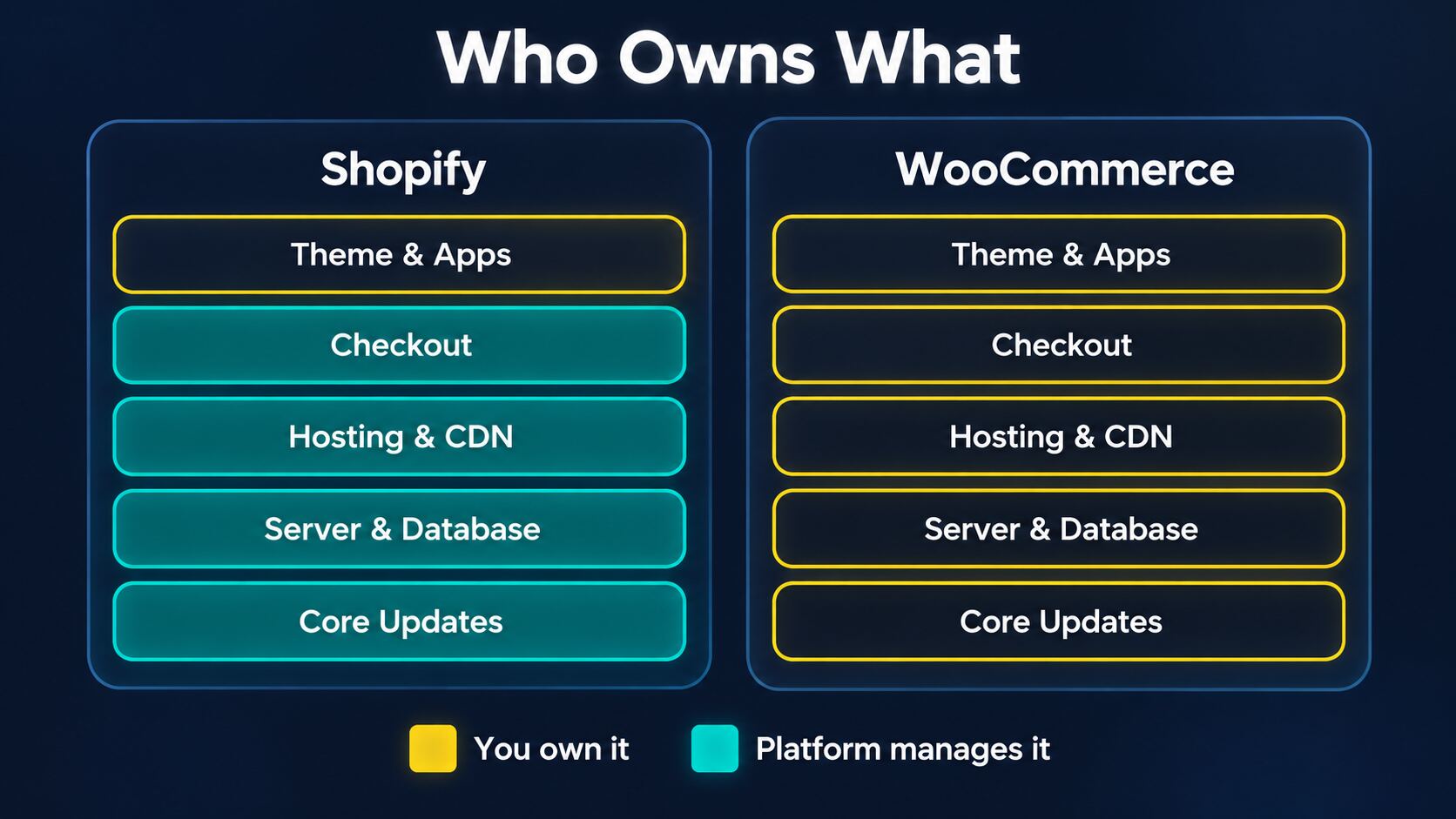
Notice that Shopify doesn't take everything off your plate. Your theme, installed apps, tracking scripts, and integrations are your responsibility on both platforms, and they cause most front-end slowdowns either way.
Winner: Shopify, for launch speed and maintenance.
Pricing in 2026: The Subscription Isn't the Real Cost
Shopify Plans and Payment Fees in the US
Here are Shopify's official US prices, as listed on its pricing page in October 2026:
| Plan | Per Month (Annual Billing) | Per Month (Monthly Billing) | Online Card Rate with Shopify Payments | Third-Party Transaction Fee |
|---|---|---|---|---|
| Basic | $29 | $39 | From 2.9% + $0.30 | 2% |
| Grow | $79 | $105 | From 2.7% + $0.30 | 1% |
| Advanced | $299 | $399 | From 2.5% + $0.30 | 0.6% |
| Plus | From $2,300 | Contract-dependent | From 2.25% + $0.30 | 0.2% |
The card rates are processing charges, not a free service. The third-party transaction fee is separate: it applies when you use a payment provider other than Shopify Payments, on top of that provider's own processing fee.
A few details change the math:
- Eligible Shopify Payments orders don't pay the third-party fee.
- Manual payments, such as true cash on delivery (COD) or bank transfer, don't pay it either.
- Shopify calculates the fee on products after discounts, plus applicable tax and shipping, and doesn't return it on refunds.
For example, a Basic store with $20,000 of monthly orders going through an external gateway pays about $400 a month in third-party fees alone (2% of $20,000). That's before the gateway's own processing costs, the plan, and apps. If those orders qualify for Shopify Payments instead, the $400 disappears, but the Shopify Payments card rates still apply.
Why the Math Changes in India
As of 9 October 2026, India isn't on Shopify's list of Shopify Payments countries. Indian stores normally use a third-party gateway for online payments, so Shopify's extra transaction fee applies to every prepaid order.
These are Shopify's official India prices, before tax:
| Plan | Per Month (Annual Billing) | Per Month (Monthly Billing) | Third-Party Transaction Fee |
|---|---|---|---|
| Basic | ₹1,499 | ₹1,994 | 2% |
| Grow | ₹5,599 | ₹7,447 | 1% |
| Advanced | ₹22,680 | ₹30,164 | 0.6% |
| Plus | From ₹1,75,000 | Contract-dependent | 0.2% |
Let's understand this with an example. Take a store processing ₹10 lakh (₹10,00,000) a month through a third-party gateway, on annual billing. The table below excludes the gateway's own charges, apps, and tax:
| Plan | Plan Fee | Shopify Third-Party Fee | Monthly Platform Cost |
|---|---|---|---|
| Basic | ₹1,499 | ₹20,000 | ₹21,499 |
| Grow | ₹5,599 | ₹10,000 | ₹15,599 |
| Advanced | ₹22,680 | ₹6,000 | ₹28,680 |
| Plus | ₹1,75,000+ | ₹2,000 | ₹1,77,000+ |
On these numbers, Grow costs ₹5,900 a month less than Basic, before you even count Grow's extra features. The break-even points on annual billing are:
- Basic to Grow: about ₹4.10 lakh a month of fee-bearing transactions. The plan costs ₹4,100 more, and the fee drops by 1 percentage point.
- Grow to Advanced: about ₹42.70 lakh a month. The plan costs ₹17,081 more, and the fee drops by 0.4 percentage points.
Don't apply these percentages to your entire GMV (gross merchandise value). COD orders don't carry the fee, so a ₹10 lakh store with 95% prepaid orders and a ₹10 lakh store with mostly COD orders get very different Shopify bills. This is why "Shopify is cheaper for small stores" doesn't hold up in India.
What WooCommerce Actually Costs
WooCommerce core is free, and WooCommerce takes no revenue share or platform transaction fee. But WooCommerce's own pricing page estimates $25 to $350 a month for hosting on many stores, and roughly $29 to $299 a year for each paid extension. You also pay your gateway's processing fees, just like on Shopify.
So comparing $0 with $29 tells you nothing. A realistic comparison runs over 36 months:
36-month cost = platform fees + third-party gateway surcharges + processing fees
              + hosting and CDN + apps or extensions + implementation
              + developer and operations time + incident risk + migration costs
Processing fees exist on both platforms, so compare the incremental platform fee and the labor, not the full payment bill.
Here's how that plays out in a few hypothetical scenarios. These are scenario budgets, not quotes:
| Scenario | Likely Economic Winner |
|---|---|
| Tiny catalog, low sales, no technical help | Shopify, because labor and simplicity outweigh the subscription |
| Existing WordPress publisher adding a modest shop | WooCommerce |
| US brand with $100,000 a month on Shopify Payments | Needs a 36-month TCO; Shopify often saves on operations |
| Indian brand with ₹30 lakh a month of gateway orders | WooCommerce, if the team can run it: Shopify's surcharge alone is ₹30,000 a month on Grow or ₹18,000 on Advanced |
| Promotion-driven brand with high concurrency | Shopify can be cheaper in operational risk despite higher fees |
| Specialized ERP or B2B setup | A proof of concept decides |
Winner: Depends on your payment mix. WooCommerce has no platform fee, while Shopify's costs are easier to predict.
Core Web Vitals: Shopify Has a Clear Edge on Average
The strongest independent data here comes from the ecommerce chapter of the 2025 HTTP Archive Web Almanac, which looks at real-user Core Web Vitals data (CrUX) for detectable ecommerce platforms. A site counts as having good Core Web Vitals only when LCP, INP, and CLS all pass together.
| 2025 HTTP Archive Field Data | WooCommerce | Shopify |
|---|---|---|
| Mobile: good Core Web Vitals | 35% | 76% |
| Mobile: good LCP | 39% | 86% |
| Mobile: good INP | 88% | 90% |
| Mobile: good CLS | 85% | 92% |
| Desktop: good Core Web Vitals | 33% | 76% |
| Desktop: good LCP | 45% | 92% |
Shopify sites were more than twice as likely to pass Core Web Vitals on mobile, and LCP (Largest Contentful Paint) explains most of that gap: 86% of Shopify sites had good mobile LCP against 39% of WooCommerce sites. INP is nearly identical at 90% vs 88%.
That's what I'd expect from the architecture. A standardized, managed stack gives every Shopify store a similar baseline, while WooCommerce results depend on the host, theme, plugins, and whoever configured them.
However, this data is observational. It doesn't control for design, traffic, geography, or budget, it doesn't measure uncached checkout speed, and it doesn't prove that moving your store to Shopify would improve conversions. 76% vs 35% is a pass rate for public pages, not a checkout speed ratio.
To see where your own store stands, check its CrUX data for mobile and desktop with our Core Web Vitals checker. If you're reading the same data in PageSpeed Insights, remember that field data and the origin summary describe different things: one URL versus your whole store.
Winner: Shopify.
Cached Pages vs Checkout: Why a 100 PageSpeed Score Can Mislead
If you've seen a WooCommerce store score 100 on PageSpeed Insights, the score is probably real. But it usually measures the easiest page on the site.
An ecommerce store has three different performance problems, and each one needs its own measurement:
- Public, anonymous pages (home, categories, products, and blog posts). These can be full-page cached and served from a CDN, so a well-configured WooCommerce store can be extremely fast here without running much PHP.
- Personalized pages (logged-in accounts, custom price lists, search and filter requests, and cart summaries). These often need PHP and database work even when the public HTML is cached.
- Transactional requests (add to cart, cart updates, checkout, order placement, and payment callbacks). These can't come from a shared cache, and WooCommerce's own caching guidance excludes the Cart, My Account, and Checkout pages from page caching.
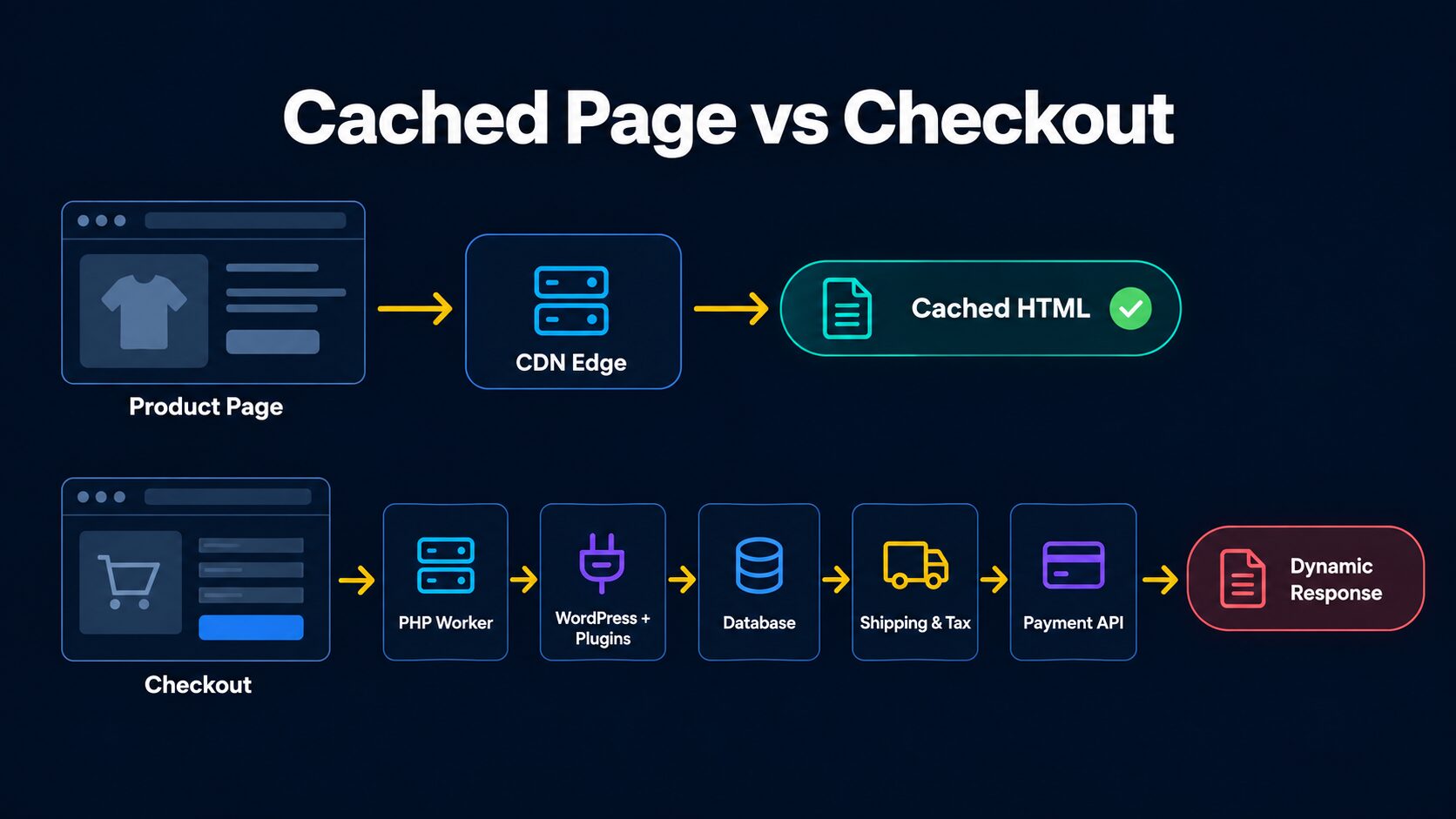
The cached product page never touches WordPress. The checkout request has to wait for a free PHP worker, load WordPress and every active plugin, query the database, and often call shipping, tax, and payment APIs before it can respond.
I covered a real example of this gap in The State of WordPress Hosting in 2026. In that WooCommerce hosting benchmark, WPX answered cached pages in about 5 ms, while checkout on the same host and the same site took roughly 2.47 s under load.
What Slows Down Uncached WooCommerce Requests
In roughly the order I'd check them:
- PHP and plugin execution. Every uncached request runs WordPress and every active plugin hook. Page builders, conditional pricing rules, and synchronous calls to external services add latency to each one.
- Database queries. Product metadata, variations, stock, coupons, sessions, and plugin data can generate a lot of queries. Wide
wp_postmetaqueries, missing indexes, and a bloated autoloadedwp_optionstable (a problem WooCommerce documents itself) can dominate response time. - Old order storage. Stores that still keep orders in posts and postmeta slow down as orders pile up. HPOS moves orders into dedicated, indexed tables, but it won't fix a slow gateway or plugin.
- PHP worker saturation. When uncached requests arrive faster than the workers can finish them, new requests queue, and p95 latency jumps even while the average looks fine.
- Checkout recalculation. Discounts, taxes, shipping, and validation can run repeatedly, and every third-party rate API adds a network round trip.
- AJAX and Store API calls. A page can look loaded while cart fragments, filters, or Store API requests are still slow. Since WooCommerce 7.8, the cart fragments script no longer loads everywhere by default, so check what your theme actually uses before disabling anything.
- Background jobs. Action Scheduler tasks, imports, syncs, emails, and backups compete with buyers for CPU and database time.
- Bots. Fake add-to-carts, filter crawling, and login attempts all create uncached work.
JavaScript, heavy themes, and images are a separate problem. They hurt LCP and INP even when TTFB is excellent, and no VPS upgrade fixes them (our guide to what matters most in website performance optimization covers the order in which to tackle them).
The Concurrency Math
Total traffic is the wrong way to size a WooCommerce server. What matters is how many expensive, uncached requests arrive at the same time.
Let's understand this with an example. Suppose one uncached checkout request holds a PHP worker for 1.2 s, and the server has 12 PHP workers:
12 workers / 1.2 s per request = 10 requests per second (theoretical maximum)
12 workers / 0.3 s per request = 40 requests per second (theoretical maximum)
If profiling brings each request down from 1.2 s to 0.3 s, the same 12 workers can handle four times as many requests without new hardware.
Yes, these are illustrative numbers, not measured WooCommerce results. Real stores run into database contention, bursty traffic, and gateway latency well before 100% utilization, and a single checkout can make several dynamic calls. But the point holds: cut the work per request before you pay for more workers.
Shopify Stores Can Be Slow Too
Shopify removes the PHP worker and database problem, but not the front end. Its own theme performance documentation says that heavy Liquid execution can raise TTFB and that app-injected JavaScript can hurt LCP and INP. Chat widgets, reviews, and upsell apps are the usual suspects, and delaying low-priority JavaScript until user interaction is one of the most effective fixes (never for checkout, cart, or consent scripts).
Deeply nested variant loops, overused metafields, unoptimized hero images, tracking tags, and slow delivery-rate callbacks all slow Shopify stores down. Our Shopify speed optimization guide covers the apps, themes, images, and scripts side in detail.
So, Shopify gives you a better starting point and less to operate. WooCommerce gives a capable team a higher ceiling on infrastructure choices, and far more room to get them wrong.
Can a Slow WooCommerce Checkout Be Fixed?
In most cases, yes. The claim that WooCommerce has an unfixable architecture is false, but so is the claim that it's now fast by default on any host with 50 plugins.
What WooCommerce Improved in 2025 and 2026
WooCommerce's developers have published concrete, workload-specific gains. These are vendor-reported examples from their test stores, not results every store will see:
| Version | Released | Performance Change |
|---|---|---|
| 9.9 | June 2025 | Faster order admin, tested on an HPOS store with over a million orders |
| 10.5 | February 2026 | Analytics and product filtering work, plus experimental product object caching (it removes repeated object creation, not all duplicate SQL) |
| 10.7 | April 2026 | Sample /wc/v4/orders request: 271 to 132 queries. Sample checkout: 204 to 172 queries without an object cache, 127 to 115 with one |
| 10.9 | June 2026 | Checkout draft orders for new sessions are created closer to order placement, cutting database writes |
| 11.0 | August 2026 | More Store API, stock, and large-catalog work; product object caching on by default for new stores |
| 11.2 | 7 October 2026 | Product importer changes and security fixes |
The sample checkout query counts dropped by about 9% to 16%, not by half. The core is getting faster, but your extensions, hosting, and uncached work still decide how your checkout performs.
Page Cache vs Object Cache
Most "my WooCommerce store is slow" fixes mix these up:
| Optimization | Helps With | Doesn't Fix |
|---|---|---|
| Full-page cache or CDN HTML cache | Anonymous public pages | Cart, checkout, account, and write requests |
| Persistent object cache (Redis or Memcached) | Repeated database reads on uncached requests | Slow PHP hooks, unique queries, locks, and external API time |
| PHP OPcache | PHP compile overhead | Slow SQL, queueing, and remote APIs |
| More PHP workers and CPU | Dynamic requests under load | Inefficient code (it can move the bottleneck to the database) |
| HPOS | Order reads, writes, and admin | Catalog, plugin, and external service problems |
| Async processing | Emails, CRM syncs, and analytics after the order | Steps needed before payment or confirmation |
WordPress's default object cache is also non-persistent unless you connect a backend. Seeing "object cache" in a plugin's settings doesn't mean Redis is actually running.
And no cache can safely serve another customer's cart, private prices, or order confirmation. That work has to run correctly every single time.
A Prioritized Fix List
Start with a baseline. Measure uncached TTFB at p50, p95, and p99 for each route (add to cart, cart update, shipping calculation, checkout, and place order), along with CPU, PHP worker usage, slow queries, Redis hit rate, and checkout error rate.
Our TTFB test shows how your cached pages respond from 40 locations. For the dynamic side, record a HAR file while you add a product and go through checkout, then open it in our HAR file analyzer to see which cart and Store API calls are slow. Production numbers need an APM tool on the server and real-user monitoring in the browser.
Then work through these in order:
- Update WordPress, WooCommerce, the theme, extensions, and PHP on staging first. WooCommerce currently recommends PHP 8.3 or later.
- Check HPOS, and enable it only after confirming that your gateways, subscriptions, and fulfillment extensions support it.
- Fix public page caching, with bypasses for cart, checkout, account, and logged-in sessions. Our Cloudflare Enterprise review includes a Cache Rule with WooCommerce cookie bypasses.
- Enable a real persistent object cache and confirm its hit rate with before and after tests on uncached routes.
- Profile and remove slow plugin and theme code, especially anything that runs full catalog queries or calls remote services on every route.
- Audit cart fragments and Store API traffic, and remove only the calls nothing uses.
- Tune PHP-FPM workers and the database to your observed concurrency, not your monthly visitors.
- Move emails, CRM syncs, and analytics off the purchase path with a reliable queue that retries failures.
- Add Store API rate limits and a WAF, after confirming your setup sees the real client IP, so you don't block paying customers during a sale.
- Load test before your next sale, with a separate session per virtual buyer and a sandbox payment gateway.
Never fix slowness by caching checkout responses or by serving stale tax, price, or stock data. A faster checkout that creates double orders is still a regression.
A headless front end won't solve this either. It can speed up cacheable rendering, but your cart and order backend is still WooCommerce.
Customization, B2B, and SEO
WooCommerce: Full Control, Full Responsibility
WooCommerce lets you change PHP business logic, templates, checkout fields, data handling, and integrations at the source level. You also keep WordPress's content model, editorial and SEO plugins, and membership or LMS integrations, which is why it suits publishers and content-led brands.
That makes it the stronger option for product configurators, quoting, negotiated pricing, and custom subscription flows. The cost is compatibility risk: every custom plugin is code you have to keep working through updates, and commercial plugin licenses create their own form of lock-in.
Shopify: Flexible Within Boundaries
Shopify's themes, Liquid, metafields, metaobjects, apps, and APIs cover most retail needs. Checkout branding works on lower plans, and supported public-app Shopify Functions can add backend customization on eligible plans.
But checkout UI extensions on the core information, shipping, and payment steps need Shopify Plus, and you can't rewrite Shopify's internal checkout, payment, or order processing. A critical custom requirement may only be possible through Plus, a supported app, an external workflow, or not at all.
Headless Shopify is possible through the Storefront API and Hydrogen, though you then run the front-end infrastructure yourself.
SEO
WooCommerce gives you deeper technical SEO control, while Shopify has good fundamentals with some URL and backend constraints. Neither platform ranks higher by default, because rankings still come down to your content, links, and how the store performs for real users.
Enterprise and B2B
Saying WooCommerce is only for small stores is wrong, and so is saying Shopify fits every enterprise. Shopify Plus is often the lower-risk option for large, conventional retail operations. WooCommerce works at high volume with a capable engineering team, and it's often the better fit for highly specialized or regulated backend logic.
For a B2B wholesaler with unusual pricing and approval flows, build a proof of concept for the hardest workflow on both platforms before committing.
Winner: WooCommerce for control, Shopify for conventional retail at scale.
Should You Optimize WooCommerce or Move to Shopify?
If your WooCommerce store is already live and slow, the answer usually depends on who can own the fixes. Most stores fit clearly into one of these two lists.
Stay on WooCommerce when most of these are true:
- The store works reliably, and only a few uncached routes are slow.
- Profiling points to specific slow queries, plugins, or external calls with clear fixes.
- You have an experienced developer or a capable managed WooCommerce host, plus a maintenance budget.
- Your checkout, subscriptions, memberships, B2B pricing, or WordPress integration would be hard to rebuild on Shopify.
- Shopify would add significant third-party gateway fees in your country.
- Your organic traffic, URLs, and customer accounts make a migration expensive to disrupt.
Move to Shopify when most of these are true:
- Your core workflows fit Shopify's plans, apps, and Functions without awkward workarounds.
- Your team doesn't want to own PHP, database, caching, updates, and security.
- You've had repeated checkout failures or sale-day incidents with nobody clearly responsible for fixing them.
- Keeping custom WooCommerce code compatible costs more than Shopify's subscription, apps, fees, and migration.
- A Shopify proof of concept shows checkout performance and business logic at least as good for your customers.
If you're unsure, a two-week pilot settles it with data:
| Step | What You Get |
|---|---|
| 1. Measure | Real-user and checkout timings, error rate, slow query log, and a peak concurrency baseline |
| 2. Quick fixes | HPOS review, plugin and SQL fixes, object cache, host tuning, and safer background jobs |
| 3. Load test | p50 and p95 checkout times, successful order throughput, and what saturates first |
| 4. Shopify proof of concept | Your top products, shipping, tax, coupons, gateway, accounts, and hardest customization |
| 5. 36-month TCO | Optimized WooCommerce costs vs Shopify plans, apps, fees, and migration |
| 6. Decision | A named owner, timeline, and measurable performance and error goals |
If the WooCommerce work cuts p95 dynamic latency and checkout failures while keeping the features you need at a better 36-month cost, stay. If the root problem is plugin complexity your team can't sustainably own, and the Shopify proof of concept passes, migrate.
Migration is not a guaranteed traffic boost, though. Map every old URL to its new one with one-to-one redirects, and watch indexing and conversions after launch. Exporting product and order CSVs also won't move customer passwords, subscription payment tokens, or custom metadata automatically, so confirm each one with your providers and test end to end.
Which is a Better Choice?
Summing up, here's your best choice:
- First store, no developer, standard products? → Shopify Basic.
- Blog or content site adding a shop? → WooCommerce.
- D2C brand with frequent launches and sale spikes? → Shopify, unless you have proven hosting, load tests, and an engineer on call.
- Indian store with mostly prepaid orders? → Price WooCommerce seriously, because Shopify's 1% to 2% third-party fee can outweigh the plan itself.
- Subscriptions, memberships, or courses tied to WordPress? → WooCommerce.
- Multi-location retail with POS? → Shopify, after checking local POS and payment support.
- Already running a fast, stable WooCommerce store? → Stay. A migration costs money and carries SEO risk without a measured gain.
- Large B2B or enterprise? → Run a proof of concept and a 36-month TCO on both.
For most non-technical businesses selling conventional products, I would choose Shopify. It removes the hosting, PHP, and database work entirely, and the 2025 field data shows that its stores pass Core Web Vitals far more often.
The exception is a store that can afford to own its stack and gains something real from it: custom workflows, a WordPress content business, or a payment mix where Shopify's surcharge costs more than good hosting and a developer. In that case, WooCommerce is the better choice, as long as you measure the uncached checkout, not just the homepage.