Cloudflare Enterprise Review: Is it worth it?


Cloudflare Enterprise has become a standard badge on WordPress hosting pricing pages. Rocket.net and Kinsta include it with their plans, Cloudways sells it as an add-on for $4.99/month per domain, and some hosts compare their bundle with a direct Enterprise contract they claim is worth $3,000 to $6,000 a month.
But Cloudflare's Free plan can already cache your HTML at the edge. Back in 2021, I used exactly that to take our then-WordPress blog to a 76 ms global average TTFB on a $1.33/month shared host.
So is a Cloudflare Enterprise hosting bundle worth paying for, or is it a badge on something you can set up yourself for free? Let's find out.
Host-bundled Cloudflare Enterprise is worth it when it costs little or nothing extra and the host uses it for safe full-page edge caching, with proper WordPress and WooCommerce bypasses. It is not the same as owning a Cloudflare Enterprise account, and the CDN, HTTP/3, the WAF, and Tiered Cache all exist on the Free plan too. If you're comfortable writing Cache Rules, the Free plan gets you most of the cached HTML speed for $0. Neither option makes logged-in, cart, or checkout pages faster than your origin server allows.
This is a documented assessment. We haven't benchmarked these hosting bundles against each other for this article. The Cloudflare details come from Cloudflare's documentation, the hosting details from each host's own pricing and support pages (as of October 2026), and the SpeedVitals numbers from our earlier WordPress and Argo tests.
What You Get When a Host Includes Cloudflare Enterprise
When a host advertises Cloudflare Enterprise, you usually don't get your own Enterprise account. The host owns or manages the Cloudflare relationship and extends selected Enterprise features to your domain.
Cloudflare even sells a product for this, called Cloudflare for SaaS. It lets a provider extend Enterprise benefits such as the WAF, DDoS mitigation, analytics, and bot mitigation to customer-owned domains. Cloudflare also documents what the end customer can't control on such a hostname, including Argo, Early Hints, and wildcard DNS.
Not every host uses Cloudflare for SaaS, but the result is similar. The host decides what's enabled, which settings you can change, which logs you see, how much bandwidth is included, and whether support requests go through them.
That's why two hosts can both say "Cloudflare Enterprise" and still sell you very different products. Here's how a typical host bundle compares with a direct Enterprise contract:
| Area | Direct Cloudflare Enterprise | Typical Host Bundle |
|---|---|---|
| Account ownership | You | The host |
| Cloudflare dashboard | Full access, based on your contract | Usually none, or a limited host panel |
| WAF configuration | You | Usually host-managed |
| Logs and analytics | Enterprise logging, per contract | A subset the host chooses |
| Support | Cloudflare, including emergency phone support | Your host |
| SLA | Cloudflare's contract | Your host's SLA |
| Leaving | Your configuration stays with you | Rules may need rebuilding |
| Price | Custom | Included, or a few dollars per domain |
This is also why I don't like the "you get $6,000 of Cloudflare for $30" pitch. Cloudflare's plans page lists Enterprise as custom pricing, and a direct contract buys things a hosting bundle doesn't pass on to you: account ownership, direct support, contractual SLAs, and full control.
Which "Enterprise" Features Are Actually Enterprise-Only?
Hosting pages often group a long list of Cloudflare features under one Enterprise heading. Many of them are available on cheaper Cloudflare plans, and several are on the Free plan.
| Feature Hosts Advertise | On the Free Plan? | What Enterprise Adds |
|---|---|---|
| Global CDN | ✅ | Same network, plus Enterprise entitlements and routing options |
| HTTP/3 | ✅ | Nothing, it's on every plan |
| HTML caching with Cache Rules | ✅ 10 rules | 300 rules, plus cookie, header, and host cache keys |
| Tiered Cache (Smart Topology) | ✅ | Generic Global, Regional, and Custom topologies |
| WAF custom rules | ✅ | Account-level WAF across many domains |
| Managed WAF rules | Free Managed Ruleset only | Full managed rules (Pro and Business have them too) |
| Rate limiting | ✅ 1 rule | Advanced Rate Limiting as a paid add-on |
| Argo Smart Routing | Paid add-on | Not automatically part of every Enterprise bundle |
| Bot Management for Enterprise | ❌ | Added by Cloudflare's account team, not automatic |
| Network Prioritization | ❌ | Contract tier only |
| Emergency phone support and Enterprise support SLAs | ❌ | Direct Enterprise customers only |
Image optimization belongs on this list too, since Cloudflare's Polish has been available below Enterprise for years. So when a host lists HTTP/3, a CDN, a WAF, and image optimization under its Enterprise heading, ask which of them you couldn't get from an ordinary Cloudflare account, and how well the host has wired the rest into its platform.
Full-Page Edge Caching Is the Feature That Matters
For WordPress, the biggest performance win in any of these bundles is serving the HTML document itself from Cloudflare's edge.
Cloudflare doesn't cache HTML by default. Out of the box, it caches static files such as images, CSS, and JavaScript, so every page view still goes back to your server for the HTML. If your origin is in the US and the visitor is in Singapore, the browser waits for that round trip (plus PHP and database time) before it can even discover the CSS and images.
Once the HTML is cached at the edge, the visitor gets the page from a nearby data center, and your server never sees the request. These are the cached HTML results we have from SpeedVitals, an independent reviewer, and the hosts themselves:
| Source | Setup | Cached HTML Result | Evidence Type |
|---|---|---|---|
| SpeedVitals (2021) | Cloudflare Free plan HTML caching, $1.33/month shared host | 76 ms global average TTFB (25 locations) | Lab test, SpeedVitals |
| HostingStep (September 2026) | Rocket.net, Enterprise edge caching | 66 ms average global TTFB (40 locations) | Lab test, independent |
| Cloudways | Enterprise Edge Page Cache | 62 ms average, down from 440 ms (45 to 85 ms by location) | Vendor test |
| Kinsta | Edge Caching on Cloudflare | Over 50% less time to serve cached HTML, on average | Vendor claim |
These tests used different tools, locations, and years, so don't rank them against each other. But all three TTFB results land under 100 ms, on the Free plan and on Enterprise alike.
Most of that speed comes from caching the HTML, which the Free plan can do too.
A good host adds the part that's hard to get right: WordPress-aware rules that cache public pages, bypass logged-in users, carts, checkout, and account pages, and purge the edge copy whenever you update a post. Cloudflare's own Cache Everything example warns that caching pages with dynamic content can show visitors information not intended for them.
Can the Cloudflare Free Plan Do the Same Thing?
Mostly, yes. And it's much easier than it was when I set it up in 2021.
Back then, the Free plan approach was a Page Rule with the Cache Level set to Cache Everything. The catch was that the "Bypass Cache on Cookie" setting requires a Business or Enterprise plan, so a Free plan rule couldn't skip the cache for logged-in users or shoppers with items in their cart. That was manageable for a simple blog, but risky for WooCommerce, memberships, or anything with user logins.
Page Rules are now being phased out, and Cloudflare plans to migrate existing ones automatically. Their replacement, Cache Rules, works on every plan (10 rules on Free, 300 on Enterprise), and a Cache Rule expression can check cookies on the Free plan too.
Here's one Cache Rule for a typical WordPress and WooCommerce site. Create a new Cache Rule with this expression and set Cache eligibility to Eligible for cache:
(http.host eq "example.com"
 and not starts_with(http.request.uri.path, "/wp-admin")
 and not starts_with(http.request.uri.path, "/wp-login.php")
 and not starts_with(http.request.uri.path, "/wp-json")
 and not starts_with(http.request.uri.path, "/cart")
 and not starts_with(http.request.uri.path, "/checkout")
 and not starts_with(http.request.uri.path, "/my-account")
 and not http.cookie contains "wordpress_logged_in"
 and not http.cookie contains "wp_woocommerce_session"
 and not http.cookie contains "woocommerce_items_in_cart"
 and not http.cookie contains "comment_author")
Replace example.com with your domain and the three shop paths with your real cart, checkout, and account URLs. If you split this into several rules instead, remember that the last matching rule wins when two rules conflict.
The rule is only as safe as its exclusion list. If a currency switcher stores the visitor's choice in its own cookie and you miss it, Cloudflare caches the first version it sees and shows euro prices to everyone. Forms are another trap: WordPress nonces expire 12 to 24 hours after they're generated, so a page with a nonce-protected form shouldn't sit in the edge cache for days.
Freshness is the other half of the job. On the Free plan, the shortest Edge TTL you can force is 2 hours (1 second on Business and Enterprise), so you need something that purges a page when you update it. Every purge method, including purge by URL, tag, and prefix, is available on all plans, but the Free plan is limited to 5 bulk purge requests per minute, against 50 per second on Enterprise.
You don't have to maintain all of this by hand:
- Cloudflare APO costs $5/month on the Free plan and is included in Pro, Business, and Enterprise. It caches your WordPress HTML at the edge and works through the official Cloudflare WordPress plugin.
- FlyingPress, which I prefer over WP Rocket (I explain why in our FlyingPress vs WP Rocket comparison), has a Cloudflare integration that works on all plans, including Free. It syncs its page exclusions and bypass cookies to Cloudflare and purges the HTML for you.
Here's how the two approaches compare for a WordPress site:
| Area | Cloudflare Free with Cache Rules | Host-Bundled Enterprise |
|---|---|---|
| HTML caching at the edge | ✅ You write the rules | ✅ Prebuilt by the host |
| Logged-in and cart bypass | ✅ If your cookie list is complete | ✅ Maintained by the host |
| Purge on update | A plugin or APO | Built into the host's cache |
| Shortest forced Edge TTL | 2 hours | Up to the host (1 second is possible) |
| Cookie or header cache keys | ❌ | ✅ If the host uses them |
| Managed WAF rules | Free Managed Ruleset | Host-managed rules |
| Argo Smart Routing | Paid add-on | Included at Cloudways and Rocket.net |
| Who fixes it when it breaks | You | Your host |
| Cost | $0 ($5/month with APO) | Included, or $1.99 to $4.99 per domain at Cloudways |
If you run a blog or a brochure site and you're comfortable with Cache Rules, the Free plan gets you most of the cached HTML speed for $0. I'd pay for a host's Enterprise setup if I didn't want to own the exclusion list (on a WooCommerce store especially), or if I wanted Argo and managed security without setting them up myself.
What Happens to Logged-In, Cart, and Checkout Traffic
Every request that can't be cached still goes to your origin, Enterprise or not. That includes wp-admin, logged-in pages, carts, checkout, account pages, most search and API requests, membership and LMS pages, and every cache miss.
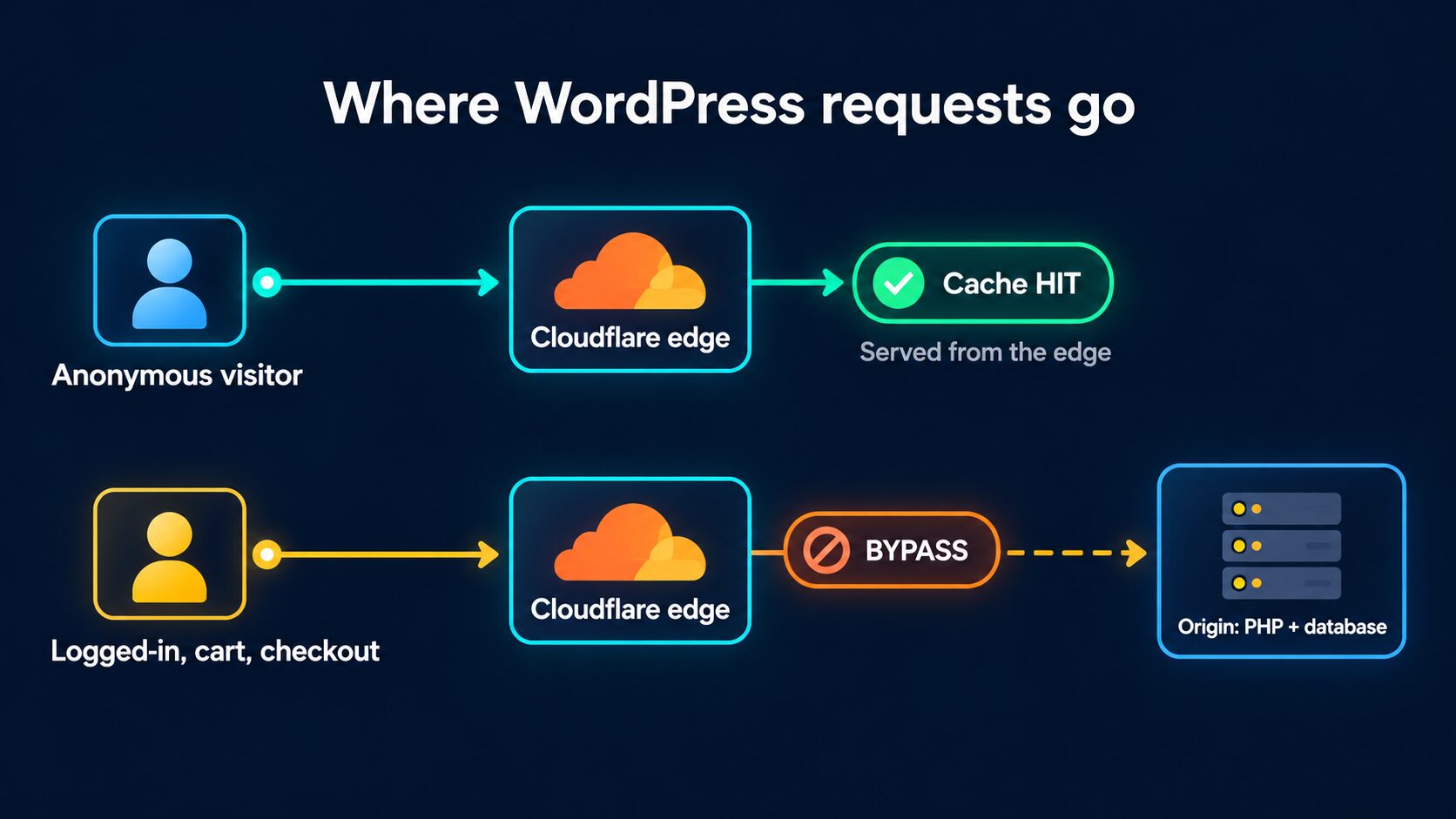
Notice that the bypass lane still passes through Cloudflare. Rocket.net's documentation makes this point: a response marked cf-cache-status: DYNAMIC still travels through its Cloudflare layer, even though it isn't served from the edge cache. You keep the security, but the speed of that page depends on PHP and the database.
HostingStep's Rocket.net review (September 2026) shows the split clearly. Rocket.net averaged 66 ms global TTFB across 40 locations, yet the same review scored its hardware 7.5/10 and recorded 346 ms in a separate North American response-time test. Its load test couldn't even finish, because Rocket's Cloudflare security blocked the test traffic.
I covered the same pattern in The State of WordPress Hosting in 2026. In one WooCommerce benchmark, WPX answered cached pages in about 5 ms, while checkout took roughly 2.47 seconds under load.
Cloudflare Enterprise can make a good origin feel fast worldwide for cached pages, but it can't make a slow origin fast for uncached ones.
This is where Argo Smart Routing matters more than most CDN features, since dynamic requests and cache misses still have to reach the origin. When we enabled Argo on SpeedVitals.com in 2024, our average global response time dropped by 40.3% (from 419 ms to 250 ms). Cloudways and Rocket.net say Argo is part of their setup, but don't assume it's on just because a host says "Enterprise." Cloudflare sells Argo as an add-on, now part of its Smart Shield product.
Security: The Protection You Get vs the Control You Get
Security is the part of a bundle that helps even on pages that can't be cached. DDoS mitigation, managed WAF rules, rate limiting, and hiding your origin behind Cloudflare all work on dynamic requests too.
But having protection and controlling it are two different things. Before you count security as a reason to pick a host, check which of these you actually get:
- Protection is active on your domain.
- You can see what was blocked.
- You can create your own WAF and rate limiting rules.
- You can tune bot protection.
- You get raw logs.
Kinsta is a good example of the managed approach. You can deny IPs in MyKinsta, but complex rules such as country blocks go through its support team, and Kinsta points customers who need advanced security tools to connecting their own Cloudflare account.
Bot protection needs the same check. Cloudflare says Bot Management for Enterprise is added to Enterprise plans by the account team, so a host with Enterprise doesn't automatically include it. Ask whether you get bot scores and rules, or only whatever the host has switched on.
For a small business, a security layer the host tunes is often more useful than a dashboard full of controls nobody configures. If you need custom WAF policies, raw logs, or direct Cloudflare support, though, a bundle will likely expose too little.
How Cloudways, Rocket.net, Kinsta, and Servebolt Differ
All four use the Cloudflare Enterprise label, but they sell quite different products (prices as of October 2026):
| Host | How It's Sold | Price | Included Bandwidth | Your Cloudflare Control |
|---|---|---|---|---|
| Cloudways | Optional add-on | $4.99/domain/month for 1 to 4 domains | 100 GB per domain, then $0.02/GB | Selected controls in the Cloudways panel |
| Rocket.net | Included on every plan | Starter at $30/month ($25/month billed annually) | 50 GB total | Highly managed, no self-service CDN off switch |
| Kinsta | Included | Entry plan at $35/month after the intro month | 125 GB CDN, then $0.05/GB | Managed, with complex firewall rules via support |
| Servebolt | Included CDN, plus partner Cloudflare plans | Included with Cloud hosting | 100 GB, then EUR 5 per 100 GB | Full Cloudflare dashboard in its partner-account model |
Cloudways is the easiest way to test whether Enterprise is worth it, because it's a separate add-on. The price drops to $3.99, $2.99, and $1.99 per domain at 5, 10, and 25 domains, and eligible domains get a one-time trial that ends after 30 days or 100 GB, whichever comes first. At that price, the add-on doesn't need a dramatic win to pay for itself, and our ROI calculator can help you estimate what a faster LCP is worth to your business. You manage it through Cloudways, not a standalone Enterprise account.
Rocket.net builds its whole platform around the edge. It documents Argo, Tiered Caching, and full-page caching with cookie bypass for WordPress and WooCommerce, which makes it a good example of why the implementation matters more than the badge. The tradeoff is control: you can't switch the CDN off yourself, and disabling cache for a site or page goes through support.
Rocket's support article also says lower Cloudflare tiers don't include "premium PoPs" in places like India and Australia. I'd treat that as a claim to verify. Cloudflare's network page says every service runs in every data center, while it separately lists Network Prioritization as a Contract-tier feature.
Kinsta suits people who want Cloudflare handled for them, not people buying Enterprise for configuration freedom.
Servebolt shows that a host bundle doesn't have to be a black box. In its partner-account model, you get full access to the Cloudflare dashboard, including DNS, firewall, and optimization settings. Its help article is also honest about the cost: if you leave, you copy those settings over manually.
At the high end, Convesio includes Cloudflare Enterprise in its Ultra plans, starting at $600/month with 500 GB of bandwidth. At that price, Cloudflare is one part of a package with CPU, RAM, scaling, and support, so judge the whole platform instead of pricing Cloudflare on its own.
The Hidden Costs: Bandwidth, Support, and Lock-In
The headline price is only part of the bill. For image-heavy or high-traffic sites, the included bandwidth can matter more than the plan name. This is the extra cost at different traffic levels, based on each host's included bandwidth and overage rate (single site, as of October 2026):
| Monthly CDN Traffic | Cloudways Add-On Total | Kinsta CDN Overage | Servebolt CDN Overage |
|---|---|---|---|
| 50 GB | $4.99 | $0 | EUR 0 |
| 100 GB | $4.99 | $0 | EUR 0 |
| 500 GB | $12.99 | $18.75 | EUR 20 |
| 1 TB (1,000 GB) | $22.99 | $43.75 | EUR 45 |
The Kinsta and Servebolt overages come on top of the hosting plan, while the Cloudways column is the full add-on price on top of your server. Rocket.net's Starter plan includes 50 GB of total bandwidth. Cloudflare's Free plan has no per-GB charge at all.
Support and SLAs don't pass through either. A direct Cloudflare Enterprise customer gets emergency phone support and initial response targets of 2 hours for P1 cases and 4 hours for P2 cases. As a hosting customer, your contract is with the host, so its uptime SLA, its 24/7 support, and its ability to escalate to Cloudflare are what count during an incident.
Lastly, the easier a host makes Cloudflare for you, the more of your edge setup belongs to the host. When you leave, you can lose the cache rules, purge integration, WAF and rate limiting rules, Argo, and your analytics history. That isn't a reason to avoid a bundle, but it's worth knowing before you build your site's security around one.
When It's Worth It and When It's Mostly Marketing
A host-bundled Cloudflare Enterprise setup is worth it when most of these are true:
- A good share of your visitors are far from your origin server.
- Most public page views can be cached safely: blog posts, documentation, landing pages, and product or category pages before a shopping session starts.
- Traffic spikes are a concern, since cached pages never wake up PHP.
- You want DDoS and WAF protection without becoming a Cloudflare specialist.
- It's included or costs a few dollars, and the host's setup is mature: edge caching, purges, and WooCommerce bypasses that work.
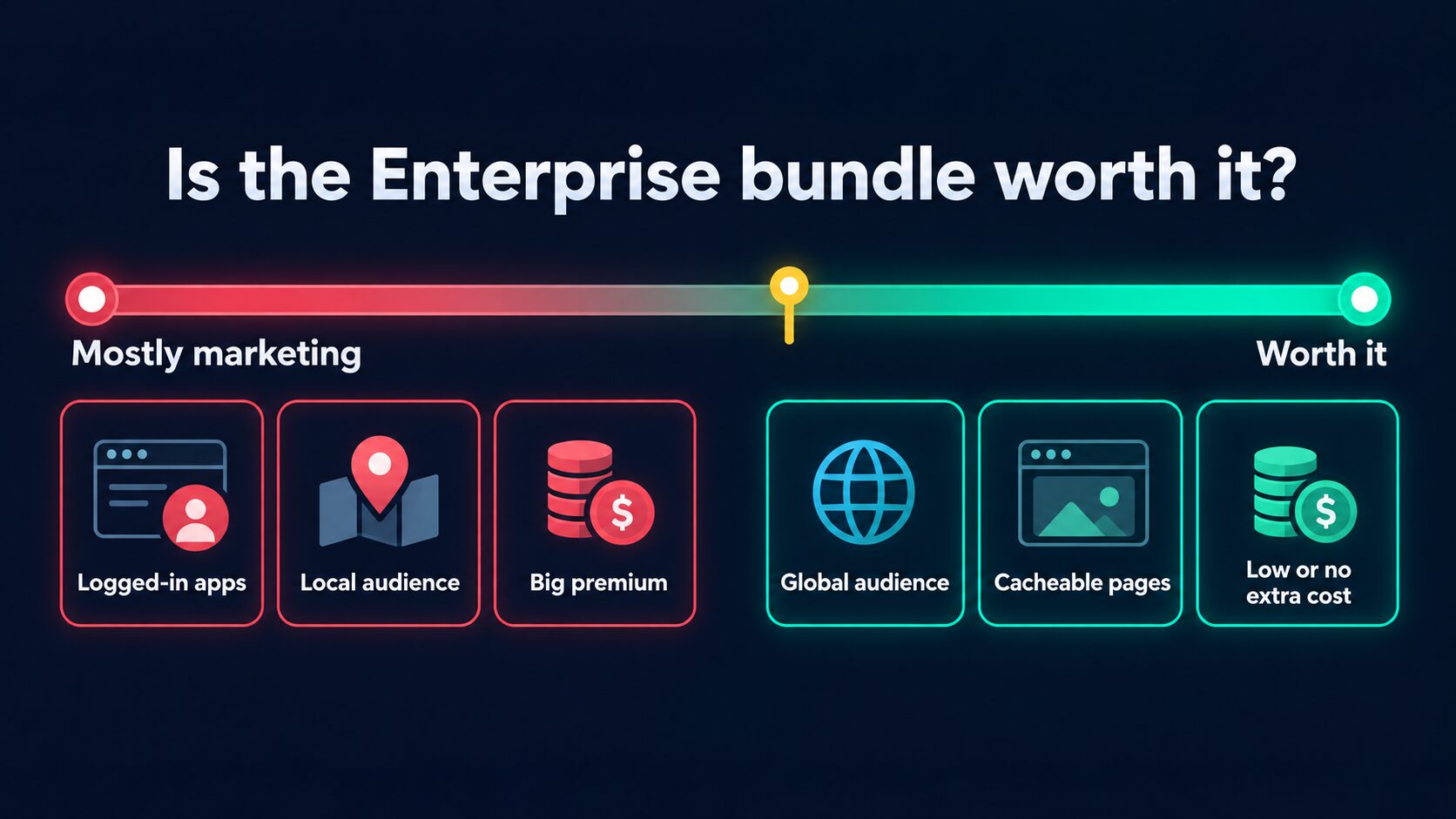
It leans toward marketing when:
- Most of your traffic is logged in or dynamic, such as LMS platforms, membership sites, dashboards, and APIs. Benchmark uncached TTFB, database time, and concurrency instead (our guide on reducing server response time covers where that time goes).
- Your audience is close to a strong origin. A site hosted in Mumbai for mostly Indian visitors has far less to gain than a US-hosted site serving India, Europe, and Asia.
- The host uses the badge to distract from weak CPU, PHP worker, or database limits.
- You need Enterprise controls yourself: custom WAF policy, advanced bot rules, raw logs, or direct Cloudflare support.
- You're paying a big premium for features that sit on the Free plan list above.
How to Test Your Host's Cloudflare Enterprise Setup
Don't rely on the host's benchmark. If you're on Cloudways, the trial makes this a cheap before-and-after test. On other hosts, test a staging copy or the trial period before you migrate everything.
-
Check the cache headers. Request a public page twice from your terminal:
curl -sI https://example.com/ | grep -iE "cf-cache-status|cf-ray|server"A
server: cloudflareheader and acf-rayID confirm the request went through Cloudflare.cf-cache-status: HITmeans the HTML came from the edge,MISSmeans it was fetched from the origin and stored, andDYNAMICorBYPASSmeans it wasn't served from cache. If your public pages always showDYNAMIC, the host isn't caching your HTML at the edge. -
Test HIT and MISS TTFB from far-away locations. Run the SpeedVitals TTFB Test (40 locations) once to warm the cache, then again for the cached result. Run it right after a purge to see the MISS numbers. The biggest gains should show up in locations far from your origin.
-
Measure uncached pages. Test the cart, a logged-in page, or wp-admin, and compare them with your current host. These are the numbers Enterprise doesn't change.
-
Check correctness, not only speed. Add a product to the cart in one browser and confirm a second browser doesn't see it. Make sure checkout and account pages are never cached, logged-in users see their own content, and forms still submit.
-
Watch the cache hit ratio and origin load. A 50 ms cached TTFB doesn't help much if only 10% of your important page views are cacheable. Compare origin requests and CPU before and after, then confirm the result for real visitors with real-user monitoring.
And please don't run your own DDoS test against a production host. Use the host's WAF event data and documentation instead.
Questions to Ask Your Host First
If a host can't answer these clearly, give the Enterprise label very little weight:
- Is my site on your Cloudflare Enterprise zone, or is "enterprise-grade" just marketing copy?
- Is HTML cached at the edge, which cookies and paths bypass it, and how does it get purged?
- Is Argo Smart Routing enabled, and which Tiered Cache topology do you use?
- Can I create my own WAF, rate limiting, and bot rules, or does support do it?
- Which analytics and security logs can I see, and who controls DNS?
- What bandwidth is included, what's the overage rate, and what happens to my Cloudflare configuration if I leave?
Conclusion
Cloudflare Enterprise is a real advantage when a host uses it well, with safe full-page edge caching, managed security, and Argo. For a WordPress site with a global audience, that cuts TTFB and origin load on every cacheable page. But the badge alone tells you very little, because HTML caching, the CDN, HTTP/3, and the WAF all exist on the Free plan, and a bundle doesn't give you your own Enterprise account or support.
Summing up, here's your best choice:
- Blog or brochure site, and you're comfortable with Cache Rules? → Cloudflare Free with a cache rule (or APO for $5/month) gets you most of the speed.
- WooCommerce store, or you don't want to maintain exclusions? → A host with a mature Enterprise setup is worth it when it's included or costs a few dollars.
- Already on Cloudways? → Turn on the trial and measure HIT, MISS, and checkout TTFB before you pay.
- Mostly logged-in or dynamic traffic? → Pick the host with the stronger origin, because Enterprise won't fix that.
- Need custom WAF rules, raw logs, or direct Cloudflare support? → Use your own Cloudflare account, or a host like Servebolt that gives you dashboard access.
What I wouldn't do is move to a more expensive or weaker host only because its pricing page says Cloudflare Enterprise.