CSR vs SSR for AI SEO: Can AI Crawlers Read JavaScript?

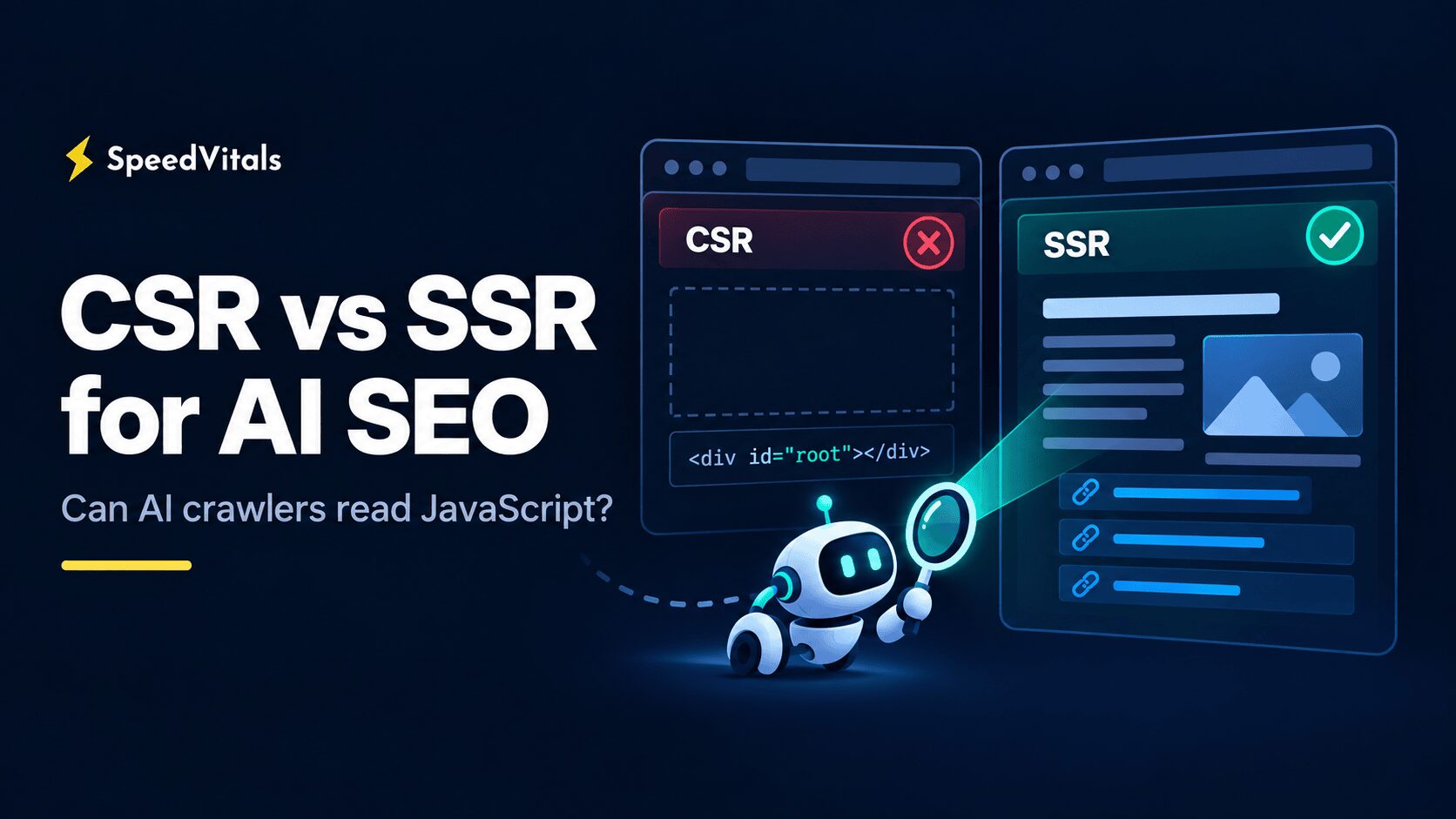
For years, the standard reply to JavaScript SEO concerns has been "Google can render JavaScript." That's still true, and a client-side rendered (CSR) React or Vue app can rank in Google when it's built well.
But Google is no longer the only system reading your pages. ChatGPT, Claude, and Perplexity run their own crawlers, and the public evidence shows most of them reading raw HTML without running your JavaScript.
So when it comes to CSR vs SSR for AI SEO, does server-side rendering (SSR) still matter if Google can handle both? Let's find out.
Server-visible HTML is the safer choice for AI SEO. Googlebot renders JavaScript, so a well-built CSR page can still appear in Google AI Overviews and AI Mode. But Vercel and MERJ crawl logs (December 2024) showed no JavaScript rendering by OpenAI, Anthropic, or Perplexity crawlers, and a 41-day test from August 2026 found them discovering zero pages linked only through JavaScript. Put the title, H1, main copy, and internal links in the initial HTML with SSR, SSG, or ISR, and let JavaScript handle the interaction.
SSR is not a ranking factor, and a weak page doesn't become worth citing just because a server rendered it. What server-visible HTML does is remove JavaScript execution as a point of failure.
We haven't run our own AI crawler test for this article. Everything below comes from official crawler documentation and two public studies, and I've noted which is which.
Let's first try and understand how CSR and SSR look to a crawler.
How CSR and SSR Look to a Crawler
With pure client-side rendering, the server sends a nearly empty HTML shell. The browser downloads the JavaScript bundle, runs it, often calls an API, and only then builds the headings, text, and links on the screen.
Here's what a crawler receives from a typical CSR app before any JavaScript runs:
<!doctype html>
<html>
  <head>
    <title>Example Store</title>
    <script type="module" src="/assets/app.js"></script>
  </head>
  <body>
    <div id="root"></div>
  </body>
</html>
For a visitor using Chrome, this works perfectly. But a crawler that reads only the first HTTP response finds an empty div with nothing to index and no links to follow.
With server-side rendering, the server builds the meaningful HTML before it responds. JavaScript then hydrates the page to make it interactive:
<body>
  <div id="root">
    <h1>Trail Running Shoes</h1>
    <p>Lightweight shoes for rocky and muddy trails, available in sizes 6 to 13.</p>
    <a href="/shoes/trail/men/">Men's trail shoes</a>
    <a href="/shoes/trail/women/">Women's trail shoes</a>
  </div>
  <script type="module" src="/assets/app.js"></script>
</body>
Two other approaches give crawlers the same result:
- Static Site Generation (SSG): The full HTML is built ahead of time and served from a CDN. Blog posts, documentation, and evergreen landing pages fit this well.
- Incremental Static Regeneration (ISR): Pages are pre-rendered like SSG but regenerated on a schedule or on demand, so the HTML stays fresh.
Hydration isn't the problem here. A page that arrives as full HTML and becomes interactive later is ideal, because the crawler doesn't need JavaScript to get the content.
The framework name doesn't tell you much either. A Next.js or Nuxt app can return full HTML, and the same app can still fetch its main content in client-only code. So judge each page by what the server sends before JavaScript runs.
In my Vite + React optimization article, I covered how to make a client-side React app fast for users. A crawler that doesn't execute JavaScript never runs that bundle, so the content it builds never exists for that crawler.
Can AI Crawlers Read CSR Websites?
Some can, but most AI-specific crawlers can't be relied on to. Googlebot renders JavaScript with Chromium, and Bingbot uses an Edge-based engine. OpenAI, Anthropic, and Perplexity don't document JavaScript rendering, and public crawl data shows their crawlers fetching HTML without running scripts.
Here's a summary of what each major crawler does with JavaScript, along with where that evidence comes from:
| Crawler | What It Does | JavaScript Rendering | Source |
|---|---|---|---|
| Googlebot | Google Search, AI Overviews, and AI Mode | ✅ Yes | Google documentation |
| Bingbot | Bing Search and Copilot grounding | ✅ Yes, but weak on JavaScript-only links | Bing documentation, 2026 link test |
| OAI-SearchBot | Surfaces sites in ChatGPT search | ❌ Not observed | Vercel and MERJ (2024) |
| ChatGPT-User | User-triggered page visits in ChatGPT | ❌ Not observed | Vercel and MERJ (2024) |
| GPTBot | OpenAI model training | ❌ Not observed | Vercel and MERJ (2024), 2026 link test |
| ClaudeBot | Anthropic model development | ❌ Not observed | Vercel and MERJ (2024), 2026 link test |
| Claude-SearchBot, Claude-User | Claude search and user-requested fetches | ❌ No public guarantee | Anthropic documentation |
| PerplexityBot | Perplexity search crawler | ❌ Not observed | Vercel and MERJ (2024), 2026 link test |
| Perplexity-User | User-triggered fetches in Perplexity | ❌ No public guarantee | Perplexity documentation |
| CCBot | Common Crawl, often used in training datasets | ❌ Not observed | Vercel and MERJ (2024) |
"Not observed" means the studies saw these crawlers fetch pages without executing scripts. It doesn't stop a vendor from adding rendering later, and none of them has published a promise either way.
Can Google AI Overviews Read Client-Side JavaScript?
Yes, if Google renders and indexes the page successfully. Google's AI optimization guide says its generative AI features are rooted in the core Search ranking and quality systems. A page only needs to be indexed and eligible to appear in Search with a snippet.
Googlebot queues pages for rendering, and a headless Chromium-based Web Rendering Service (WRS) executes the JavaScript before indexing (JavaScript SEO basics). So a React, Vue, or Angular single-page app can appear in AI Overviews.
However, rendering adds failure points that plain HTML doesn't have:
- JavaScript files and API endpoints must be crawlable and must respond successfully to Googlebot.
- The WRS is stateless, so content that depends on a login, cookies, or session data won't render.
- Googlebot fetches only the first 2 MB of any individual URL, including the HTTP headers (Inside Googlebot, March 2026). Each JavaScript file has its own 2 MB limit, and the WRS can only run code that was actually fetched.
Google itself recommends server-side rendering, static rendering, or hydration, and calls dynamic rendering (serving prerendered HTML only to bots) a workaround rather than a long-term solution. CSR can work for AI Overviews, but server-visible HTML removes one dependency from the pipeline.
How Bing and Microsoft Copilot Handle JavaScript
Bing can technically read CSR pages, but Microsoft tells you not to depend on it. Bingbot's rendering engine tracks the latest stable version of Microsoft Edge (Bing crawler documentation). Even so, Bing's current Webmaster Guidelines tell publishers not to hide critical content behind client-side rendering.
The same guidelines say Bing and Copilot share one crawling, indexing, and ranking foundation. Content that Bing can't reliably render may not be selected for grounding results.
The 2026 link test below also found that Bingbot discovered very few pages linked only through JavaScript. For Copilot, I would treat rendering as a bonus, never as something essential content depends on.
Can ChatGPT Search Read CSR Websites?
Not reliably. OpenAI doesn't document JavaScript rendering for any of its crawlers, and a crawl-log study by Vercel and MERJ (December 2024) saw none of them execute JavaScript. If your main content appears only after JavaScript runs, assume ChatGPT's own crawler and fetcher can't read it.
If you've been allowing or blocking GPTBot to control your ChatGPT Search visibility, you've been adjusting the wrong crawler. OpenAI documents three crawlers with separate jobs:
- OAI-SearchBot surfaces websites in ChatGPT search results, and OpenAI recommends allowing it if you want to appear there.
- ChatGPT-User visits pages for some user-triggered actions and doesn't decide automatic search inclusion.
- GPTBot crawls content that may be used to train OpenAI's foundation models.
These controls are independent. You can allow OAI-SearchBot and ChatGPT-User for visibility and still block GPTBot if you don't want your content used for training.
The Vercel and MERJ study is still the strongest public data on this. GPTBot made 569 million requests across Vercel's network in one month, and ChatGPT's crawlers fetched JavaScript files in 11.50% of requests. But there was no evidence that any of those scripts were executed, so whatever content they would have built never reached OpenAI.
Can Claude and Perplexity Read CSR Websites?
Neither should be relied on to. Both companies document what their crawlers are for, but neither publishes a JavaScript rendering guarantee like Google's. Public crawl data shows their crawlers working like simple HTML fetchers.
Anthropic documents three crawlers: ClaudeBot for model development, Claude-SearchBot for search results, and Claude-User for fetching pages when a user asks Claude something. In the same Vercel study, Claude's crawler fetched JavaScript files in 23.84% of requests, about twice as often as ChatGPT's. It still didn't execute them.
Perplexity's documentation lists PerplexityBot as its search crawler and Perplexity-User as its user-triggered fetcher. The Vercel study placed PerplexityBot among the crawlers that didn't render JavaScript, and the 2026 link test found the same.
Until either company says otherwise, I would treat Claude and Perplexity as raw HTML readers.
What the 2026 Crawler Tests Found
Most "can crawler X render JavaScript?" discussions stop at whether the bot requested a JavaScript file. A 41-day experiment by Vinicius Stanula, published in Search Engine Land on 19 August 2026, tested something more basic: whether crawlers can find pages that are linked only through JavaScript.
The site had roughly 2,400 pages, including a controlled hierarchy of over 1,000 pages. One branch used standard HTML links, and the other exposed its links only after JavaScript ran.
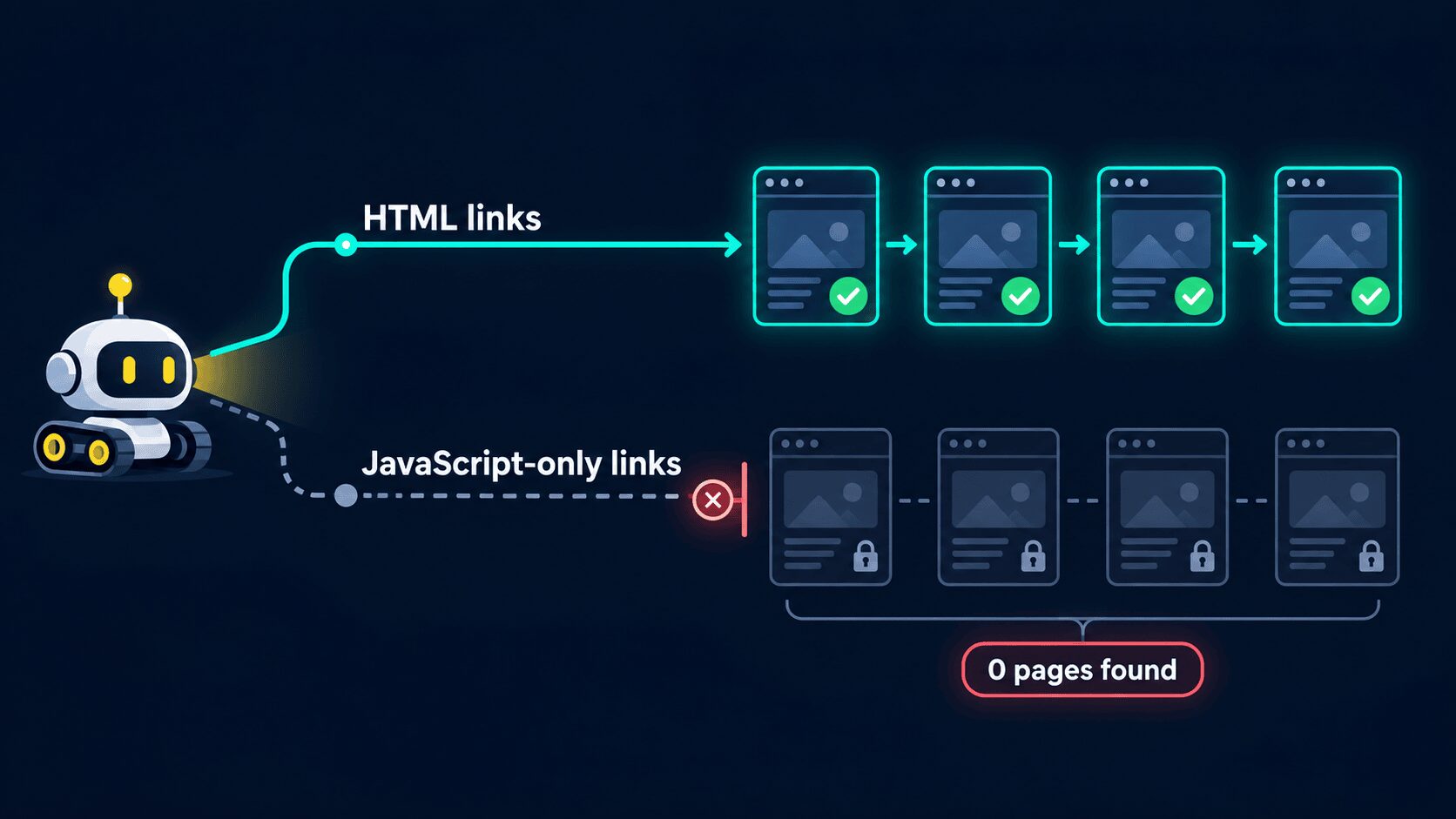
Here's what the crawler logs showed for the JavaScript-only branch:
| Crawler | Pages Discovered Behind JavaScript-Only Links |
|---|---|
| GPTBot (OpenAI) | 0 |
| ClaudeBot (Anthropic) | 0 |
| PerplexityBot | 0 |
| Meta and Amazon crawlers | 0 |
| Bingbot | Very few |
| Google's crawlers | Some, but far fewer than through HTML links |
GPTBot made thousands of requests and crawled the HTML-linked hierarchy, yet it never reached a single page behind a JavaScript-only link. ClaudeBot behaved the same way.
Bingbot is the surprising result, since Microsoft documents an Edge-based renderer. Even Google, the only crawler stack that meaningfully reached the JavaScript-linked side, covered it far less than the HTML side.
Rendering capability and rendering coverage are different things.
This matters even when every page is server-rendered. If the only link to a product page appears after JavaScript runs, an AI crawler may never request that URL.
The limitation is that this was one controlled site, not a census of the web. I'd still treat it as strong directional evidence, mainly because it agrees with what Vercel and MERJ saw across a much larger network.
Why ChatGPT Can Cite a CSR Page It Never Read
If you've seen your CSR site cited in ChatGPT, it doesn't prove that OpenAI rendered it. OpenAI's Publishers and Developers FAQ says it can get URLs from other search providers in some cases. A page that Google rendered and indexed can surface in ChatGPT that way.
AI search involves four separate steps:
- Discovery: Does the system know the URL exists?
- Retrieval: Does it pick the URL for a query?
- Reading: Does it fetch enough of the page to understand the answer?
- Citation: Does it show the page as a source?
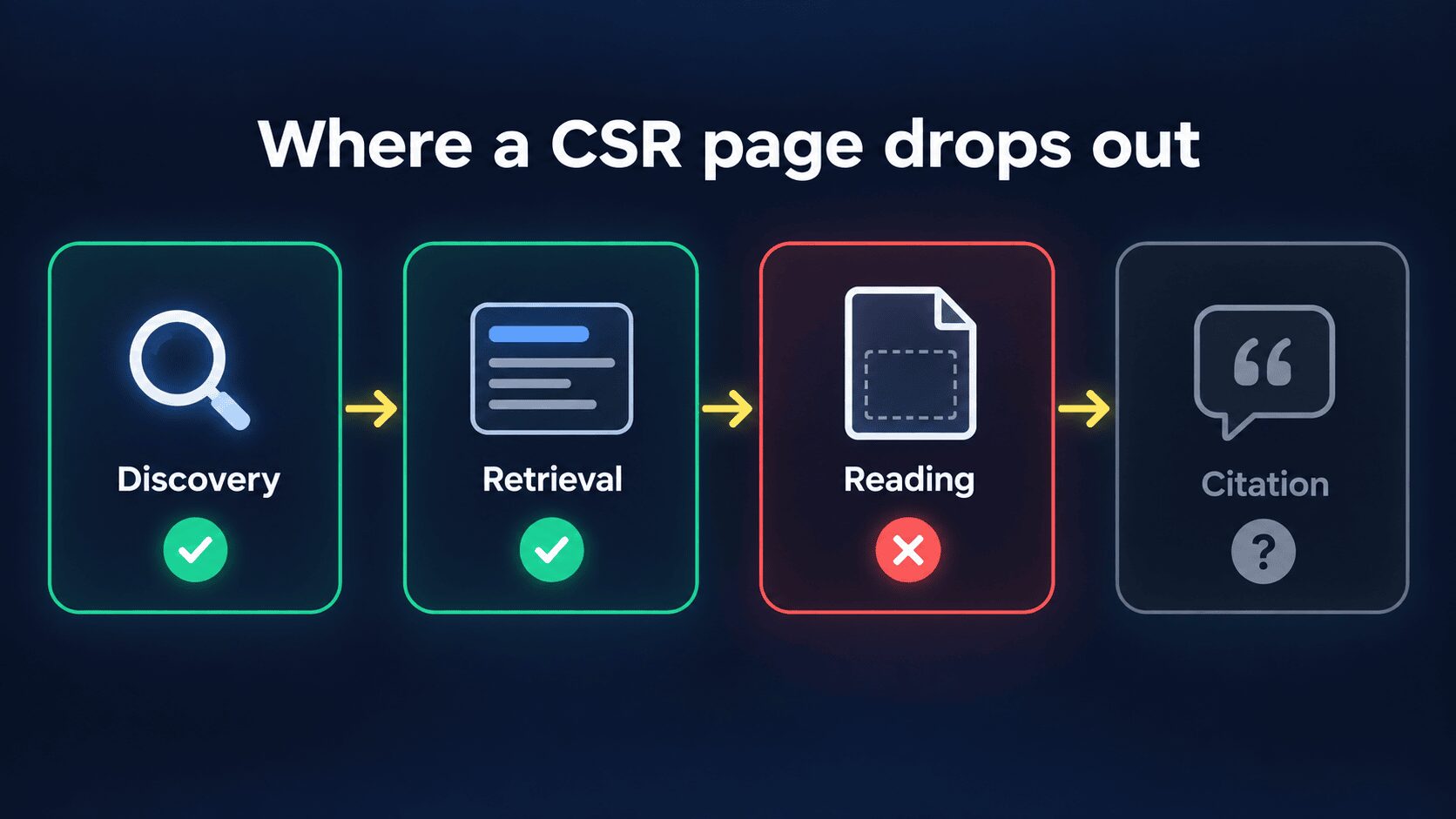
A CSR page can pass the first two steps through an external index and still fail the third. That's how a page gets cited from its title and snippet while the system can't read the details inside it.
A separate Search Engine Land investigation from 17 August 2026 analyzed about 1,200 ChatGPT answers, 88,000 search results, and 26,900 distinct pages. It described a search index, a shared page-reading cache, and relatively rare live page opens. On the page-reading path:
- JavaScript wasn't executed.
- Pages were converted from HTML to Markdown, with scripts and iframes stripped.
- JSON-LD was stripped as well.
- Many answers used index snippets without opening the page at all.
This is reverse-engineered behavior, not OpenAI documentation, and ChatGPT's pipeline changes quickly. But the conclusion matches everything above: an answer in the initial HTML stays usable on more retrieval paths.
CSR vs SSR for AI SEO: Side-by-Side Comparison
The table below compares both approaches across the systems that matter for AI search:
| Factor | SSR or Static HTML | Pure CSR |
|---|---|---|
| Core content in the first response | ✅ Yes | ❌ Usually not |
| Readable without the crawler running JavaScript | ✅ Yes | ❌ No |
| Google Search, AI Overviews, and AI Mode | ✅ Excellent | Workable if Google renders and indexes it |
| Bing and Copilot | ✅ Excellent | Possible, but Bing advises against it for critical content |
| ChatGPT, Claude, and Perplexity crawlers | ✅ Best option | ❌ High risk for client-only content |
| Internal link discovery | ✅ Reliable with <a href> links | ❌ JavaScript-only links may never be found |
| Structured data | ✅ Available immediately | Client-injected schema can be missed |
| Server compute | Higher for uncached request-time SSR | ✅ Usually lower |
| Interactivity | ✅ Full, after hydration | ✅ Full |
| Best fit | Public content, ecommerce, docs, marketing pages | Dashboards, admin tools, pages behind a login |
Winner: SSR, or any other form of server-visible HTML, for every public page you want found and cited. CSR only wins on server cost and simplicity, which matter most for pages that don't need to be found.
SSR vs SSG vs ISR: Which is Best for GEO?
For generative engine optimization (GEO), server-visible HTML is the goal, and request-time SSR is only one way to produce it. To an AI crawler, a static page and a server-rendered page look the same.
Here's the order I would follow for public pages:
- SSG or prerendered HTML for blog posts, documentation, help pages, and evergreen landing pages. The HTML exists before any request arrives, so a CDN can serve it with almost no server work.
- ISR or cached server rendering for content that changes periodically, such as product pages, pricing pages, and directories.
- SSR when the indexable HTML truly depends on request-time data, such as live inventory or localization.
- Pure CSR for authenticated dashboards, admin tools, and widgets that don't need to be found.
Before choosing request-time SSR, check TTFB. I've always emphasized that TTFB is the first step of any optimization, because a slow first byte delays FCP and LCP for every visitor.
If every request makes your server fetch data and render the page from scratch, TTFB goes up. So SSR isn't automatically faster than CSR; it depends on caching, server latency, payload size, and hydration cost.
This is why I would pick SSG or ISR whenever the data allows it, and cache SSR output at the edge for everything else. After switching, run the page through the SpeedVitals TTFB test to confirm the response stays fast across regions.
Our guide to reducing server response time covers what to do if it doesn't.
Which Parts of a Page Need to Be Server-Rendered?
You don't have to give up JavaScript to be readable by AI crawlers. The rule I would follow for any public page:
Server-render the meaning, client-render the interaction.
Put these in the initial HTML:
- The
<title>, meta description, canonical URL, and robots directives - The H1 and the main body copy that answers the query
- Product or service names, descriptions, and public prices where relevant
- Comparison tables and FAQ text that are genuinely part of the page
- Breadcrumbs, pagination links, and internal links to categories, products, and articles
- Alt text for important images
- JSON-LD structured data, when you use it
Leave these to JavaScript:
- Filters, sorting, and calculators
- Tabs and accordions whose text already exists in the HTML
- Chat widgets, live counters, and social feeds
- Personalization, animations, and client-only state
Chat widgets and social feeds are also good candidates for delaying until user interaction, since neither needs to load before the visitor does something.
Tabs and accordions are fine when the text exists in the HTML and JavaScript only toggles its visibility. They become invisible to AI crawlers when opening a tab triggers an API request for content that wasn't in the response.
Prices and stock levels have the same problem. Server-render a meaningful public value and update it on the client, instead of shipping a "Loading..." placeholder filled by a client-side API call.
Some frameworks also embed page data as serialized JSON or a React Server Components payload. Vercel noted that AI crawlers sometimes encounter these payloads, but I wouldn't rely on them for important content.
Why JavaScript-Only Internal Links are a Bigger Problem
It's easy to confirm that the article body appears in the source and forget about navigation. As the 2026 link test showed, a server-rendered page can stay invisible to AI crawlers if every path to it is created by JavaScript.
Watch out for these patterns:
- Navigation menus built entirely in client-side JavaScript
- Product or article cards that use an
onclickhandler instead of a real link - "Load more" buttons that reveal the only links to deeper pages
- Infinite scroll without crawlable paginated URLs
- SPA routes that exist only as client state
- Client-generated faceted navigation that is the only path to important category pages
Every important public URL needs at least one ordinary link in the server-rendered HTML:
<!-- Crawlable: a real link in the initial HTML -->
<a href="/guides/core-web-vitals/">Core Web Vitals guide</a>

<!-- Risky: no href, so crawlers have no URL to follow -->
<div class="card" onclick="router.push('/guides/core-web-vitals/')">Core Web Vitals guide</div>
You can keep infinite scroll for users. Just expose paginated URLs such as /blog/page/2/ with standard links, which helps classic SEO as much as AI crawlers.
Structured Data and llms.txt Won't Fix a CSR Page
Structured data supports a page, but it doesn't replace visible content. Google can process JSON-LD injected by JavaScript after rendering, but a non-rendering crawler never runs that script. The ChatGPT retrieval study also found JSON-LD stripped on the page-reading path.
Google's AI optimization guide says structured data isn't required for generative AI search, and there's no special schema.org markup to add. Put important facts in visible, server-delivered text and use structured data to reinforce them.
An llms.txt file doesn't fix rendering either. Google says you don't need AI text files or Markdown versions of your pages to appear in Search, and that Google Search ignores them. Even if an AI tool reads your llms.txt, the page itself still has no content or links in its raw HTML.
How to Test What AI Crawlers Can See
The simplest rule I can give you: if curl can't see the important content, assume ChatGPT, Claude, and Perplexity can't see it either. It's deliberately conservative, but it's a safe baseline for every crawler in the table above.
1) View the Raw HTML, Not DevTools
Open the page with View Source (view-source: in Chrome), not the Elements panel. The Elements panel shows the DOM after JavaScript runs. A CSR page can look complete there even when the initial response is an empty shell.
Check the source for the H1, main paragraph, product or service details, title, canonical tag, and internal <a href> links.
2) Fetch the Page with curl
Pick a phrase that appears only in the main content and search for it in the raw response:
curl -sL https://example.com/page/ | grep -i "a unique phrase from the article"
If the command prints nothing, a non-rendering crawler probably won't see that text either.
To get closer to what ChatGPT's page reader works with, save the raw response and paste it into our HTML to Markdown converter. It strips scripts and styles without running JavaScript, so whatever is left is roughly the text a Markdown-based reader gets from your page.
3) Repeat the Fetch with Crawler User Agents
A crawler's user agent doesn't simulate rendering. It shows whether your CDN, web application firewall (WAF), or bot protection treats that crawler differently from a browser.
# Example: copy the current user agent string from each vendor's crawler documentation
curl -sL -o /dev/null -w "%{http_code} %{size_download}\n" \
  -A "OAI-SearchBot/1.0" https://example.com/page/
Repeat it for each crawler in the table and compare the status code, response size, title, H1, and body copy. Some WAFs verify crawlers by IP address, so a spoofed request can get blocked even when the real crawler is allowed.
4) See Which Parts of the Page are Client-Rendered
Run "Disable JavaScript" from the Chrome DevTools Command Menu and reload the page. If the article or product details disappear, AI crawlers will most likely miss them too.
For a more detailed view, the SEO Render Insight Tool Chrome extension by Amin Foroutan highlights the elements that were likely rendered on the client and estimates what share of the page is CSR vs SSR. It's an excellent way to find out which sections of a hybrid page still depend on JavaScript.
5) Compare with Google and Bing URL Inspection
Google Search Console's URL Inspection tool shows the HTML Google renders, and Bing Webmaster Tools has its own URL Inspection. If critical content appears in the rendered version but not in the raw response, Google can index it while non-rendering AI crawlers can't.
6) Check Your Server Logs
Logs are the strongest evidence for your own site. Look for the crawler's user agent (verified by IP where the vendor publishes ranges), status codes, bytes sent, requests for deeper URLs, and repeated 403, 429, or 5xx responses.
Robots.txt rules, WAF settings, rate limits, JavaScript challenges, and CAPTCHAs are separate from rendering. OpenAI recommends allowing OAI-SearchBot and its published IP ranges for ChatGPT search, and Perplexity publishes its IP ranges for WAF allowlisting. Before concluding that a crawler can't read your SSR page, confirm it received the real page and not a 403 or a challenge.
Should You Migrate a CSR Site to SSR?
If the page should be found and cited by AI systems, yes. Move its important content and links into the initial HTML.
Pure CSR can still work for Google AI Overviews, but it's an unnecessary risk with ChatGPT, Claude, and Perplexity. This advice also holds if AI crawlers start rendering JavaScript later, because content in the initial HTML works no matter what a crawler can do.
Summing up, here's your best choice:
- Blog posts, documentation, and landing pages? → SSG or prerendered HTML.
- Product, category, and pricing pages? → ISR or cached SSR.
- Pages that depend on request-time data? → SSR with edge caching, while keeping an eye on TTFB.
- A public tool or calculator? → Server-render the explanation and links, then hydrate the tool on the client.
- Dashboards, admin panels, and pages behind a login? → CSR is fine.
The only case where I'd keep pure CSR on a public page is when nothing on it needs to be found. That means the page is excluded from search, or its indexable content already sits in a small server-rendered shell.
If you do migrate, compare the raw HTML with curl before and after the change. Then re-test TTFB from multiple regions, because an SSR page with a slow first byte fixes the crawler problem while delaying LCP for every visitor.